



Website Personalization: 7 Ways to Make Visitors Feel Understood
Think about the last time you visited a website that seemed to understand exactly what you needed. The information was relevant, the next step was clear, and you did not have to dig through pages of unrelated content to find an answer.
Now think about the opposite experience: a website that shows the same message to everyone, regardless of what they are looking for.
That difference matters to businesses.
People visit websites with different questions, expectations, budgets, and levels of familiarity with a company. A first-time visitor may want a simple explanation of your services. Someone comparing providers may need pricing information. A returning customer may want quick access to support.
Website personalization helps businesses make these experiences more relevant to different visitors without turning the website into a confusing maze of different versions.
Done thoughtfully, it can make information easier to find, guide visitors towards useful next steps, and create a more helpful experience. The key is to personalise around genuine customer needs rather than collecting data simply because the technology allows it.
What Is Website Personalization?
Website personalization means adapting parts of a website to make the experience more relevant to a visitor or group of visitors.
Depending on the website, this could involve displaying relevant content, recommending products, adjusting navigation, or showing different calls to action based on a visitor’s needs.
For example, a company selling software to both small businesses and large organisations might provide separate paths for each audience. A small business owner could see information about ease of use and essential features, while an enterprise visitor might find details about integrations, access controls, and implementation requirements.
The underlying website can remain largely the same. The difference is that visitors can reach the information most relevant to them more easily.
Personalization does not always require artificial intelligence or complicated technology. Sometimes, clearer navigation and well-organised audience-specific pages are enough to make a meaningful improvement.
Why Website Personalization Matters for Businesses
A website often has only a short window to help visitors understand whether a business is relevant to them.
When people cannot find useful information, they may leave—even if the company offers exactly what they need.
Website personalization can help businesses:
- Present relevant information without making visitors search unnecessarily.
- Help different customer groups find the right services or products.
- Make product discovery more useful in online stores.
- Guide returning visitors towards appropriate next steps.
- Create more relevant calls to action.
- Reduce friction in important customer journeys.
These benefits are not automatic. Personalization works best when it solves a real problem, such as confusing navigation or irrelevant recommendations. Adding personalised pop-ups everywhere can make the experience worse rather than better.
7 Practical Website Personalization Strategies
1. Organise Content Around Different Customer Needs
Your visitors may arrive at the same website for very different reasons.
A startup looking for a website may care about launch time and affordability. An established business may be more concerned about integrations, scalability, and ongoing support.
Instead of forcing both audiences through the same generic page, make it easy for them to find relevant information.
You could create dedicated service pages, industry pages, or clearly labelled pathways based on the problems your customers want to solve.
For example, a software company might organise its website around business challenges such as improving internal workflows, building customer-facing applications, or connecting existing systems.
This is a simple form of personalization because the experience becomes more relevant without requiring individual tracking or complicated automation.
2. Recommend Products Based on Relevant Preferences
For an eCommerce business, helping customers discover suitable products can make shopping easier.
A clothing store might recommend similar styles, complementary accessories, or products within a selected price range. A homeware store could suggest related items based on the category a customer is browsing.
The recommendations should make sense in context. Showing unrelated products simply because they are popular can distract shoppers and reduce trust.
Start with useful categories, filters, and related-product sections. If the store has enough reliable data, more advanced recommendation systems may help refine the experience.
Always give customers control over their choices. Personalization should support browsing, not make it difficult to compare alternatives.
3. Make Calls to Action Relevant to the Visitor’s Stage
Not every visitor is ready to make a purchase or book a consultation.
Someone discovering your business for the first time may need a detailed service explanation. A visitor comparing solutions might want pricing, a demonstration, or a case study. An existing customer may need support.
Your website should offer appropriate next steps for these different situations.
For example:
- New visitors: “Explore Our Services.”
- Visitors comparing options: “View Plans and Features.”
- Interested prospects: “Book a Consultation.”
- Existing customers: “Get Support.”
These do not have to change automatically for every individual. Thoughtful page design and clear choices can help visitors find the next step that suits them.
If you do use behavioural personalization, make sure it is relevant, transparent, and not overly persistent.
4. Create More Relevant Landing Pages
Imagine running a digital campaign for businesses that need an online store. Sending every visitor to a generic homepage creates an unnecessary extra step.
A focused landing page can explain the relevant service, answer common questions, show suitable examples, and provide a clear next action.
Different campaigns or customer groups may need different landing pages, particularly when their goals and expectations differ.
The important part is consistency. The page should match the message that brought the visitor there.
For additional guidance on building focused customer journeys, read about landing page optimization, and consider how the information on each page supports the visitor’s actual goal.
5. Help Returning Visitors Find What They Need
Returning visitors may already know your brand and may not need to repeat every step of their earlier journey.
Depending on the website and the information available with appropriate permission, you could make useful resources easier to access, remember non-sensitive preferences, or provide convenient links to recently viewed categories.
For example, a learning platform might help a returning user reach their course dashboard quickly. A business portal might show the status of an existing request.
Keep the experience simple. Do not assume that every returning visitor has the same intention as before, and always provide a straightforward way to navigate elsewhere.
6. Use Location Carefully When It Improves the Experience
Location can be useful when a business serves different regions.
A visitor may need local service information, region-specific availability, relevant delivery details, or the correct contact information.
For example, a business operating in multiple countries might offer a clear country selector so visitors can access the right pricing and support details.
However, location-based personalization should be used only when it genuinely helps. Automatic location detection can be inaccurate, and visitors should not be prevented from selecting another region.
Avoid collecting or using precise location data unnecessarily. Clear choices often provide a better experience than trying to guess what every visitor wants.
7. Measure Results and Improve Gradually
Personalization should not be judged by how advanced the technology looks. It should be judged by whether it helps people accomplish their goals.
Choose a clear objective before making changes.
For an online store, you might measure product discovery and completed purchases. For a service website, you might examine qualified enquiries or consultation bookings. For a customer portal, successful task completion may be more useful than page views.
Compare the experience before and after a change, while accounting for other factors that may influence results.
Start with a small improvement, measure its effect, and expand only when the evidence supports it.
Avoid collecting unnecessary personal information simply to create more detailed visitor profiles. In many cases, improving the content and structure of your website can achieve the desired result with less complexity.
Website Personalization Mistakes to Avoid
Personalization can make a website feel more helpful, but poor implementation can have the opposite effect.
Personalizing without a clear purpose: Every change should solve a real customer problem.
Showing too many pop-ups: Repeated interruptions make it harder to browse and can damage trust.
Making incorrect assumptions: A visitor’s previous activity does not always reveal their current needs.
Ignoring privacy: Collect only the information you genuinely need, explain how it is used, and respect applicable privacy requirements.
Creating inconsistent experiences: Pricing, product details, and service information should remain accurate across relevant pages.
Overcomplicating the technology: A complicated personalization system may be unnecessary when clearer navigation or better content would solve the problem.
Failing to test changes: A personalised experience is not automatically better. Measure its effect and be prepared to adjust it.
The best approach is usually to start small, solve a specific problem, and expand gradually.
Does Website Personalization Require AI?
No. Artificial intelligence can support advanced recommendations, content selection, and automated experiences, but it is not a requirement.
A website can become more relevant through well-organised content, audience-specific landing pages, clear navigation, useful product filters, and sensible calls to action.
AI may be useful when a business has a clear objective, suitable data, and a practical way to evaluate the results. It should not be introduced merely to make the website appear more advanced.
Before investing in sophisticated technology, identify the customer problem you want to solve and determine whether a simpler approach would work just as well.
How HiveRift Can Help Build a Better Website Experience
A good business website should make it easy for visitors to understand your offering, find relevant information, and take the next step without unnecessary confusion.
That starts with understanding your audience, structuring content carefully, and designing journeys around real business goals. Personalization can build on that foundation when it offers a clear benefit to visitors.
Explore HiveRift to learn more about its digital solutions and discuss your website requirements.
Conclusion: Make Your Website More Relevant, Not More Complicated
Website personalization is not about making every visitor see a completely different website. It is about helping people find information and options that make sense for their needs.
Start by understanding your audience. Organise your content clearly, create relevant pathways, make calls to action useful, and measure whether your changes improve the experience.
As your business learns more about its customers, you can introduce additional personalization where it provides genuine value.
The goal is simple: make your website feel more helpful because visitors can find what they need—not because the website knows everything about them.
Frequently Asked Questions (FAQs)
1. What is website personalization?
Website personalization is the practice of adapting website content, recommendations, navigation, or calls to action to make the experience more relevant to different visitors or customer groups.
2. Does website personalization help increase conversions?
It can help when it removes friction and makes relevant information easier to find. Results depend on the audience, website, implementation, and the quality of the experience. Businesses should test changes rather than assume personalization will automatically increase conversions.
3. Is website personalization suitable for small businesses?
Yes. Small businesses can start with audience-specific pages, clearer navigation, relevant service information, and useful calls to action. These improvements often require less complexity than advanced personalization software.
4. What data is needed for website personalization?
The information required depends on the experience. Some approaches use only the page a visitor is viewing or preferences they select. More advanced systems may use purchase history or other permitted data. Collect only what is necessary and handle it responsibly.
5. Is website personalization the same as website customization?
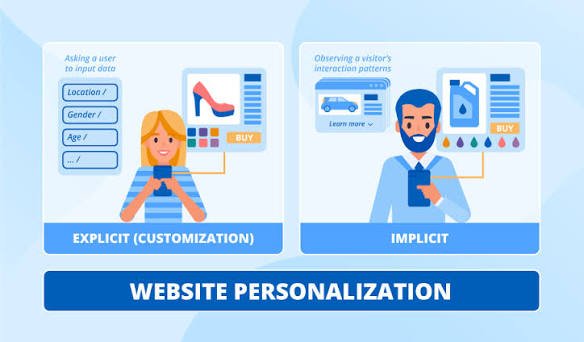
They are related but different. Personalization often adapts the experience based on available information or behaviour. Customization usually refers to choices made directly by the user, such as selecting a preferred language or theme.
6. Can website personalization work without AI?
Yes. Clear audience pathways, relevant landing pages, useful product filters, and well-organised content can make a website more relevant without AI.
7. How can a business measure website personalization?
Choose measures that match the goal, such as completed purchases, qualified enquiries, successful task completion, or engagement with relevant content. Compare results carefully and consider privacy when collecting and analysing visitor data.


