



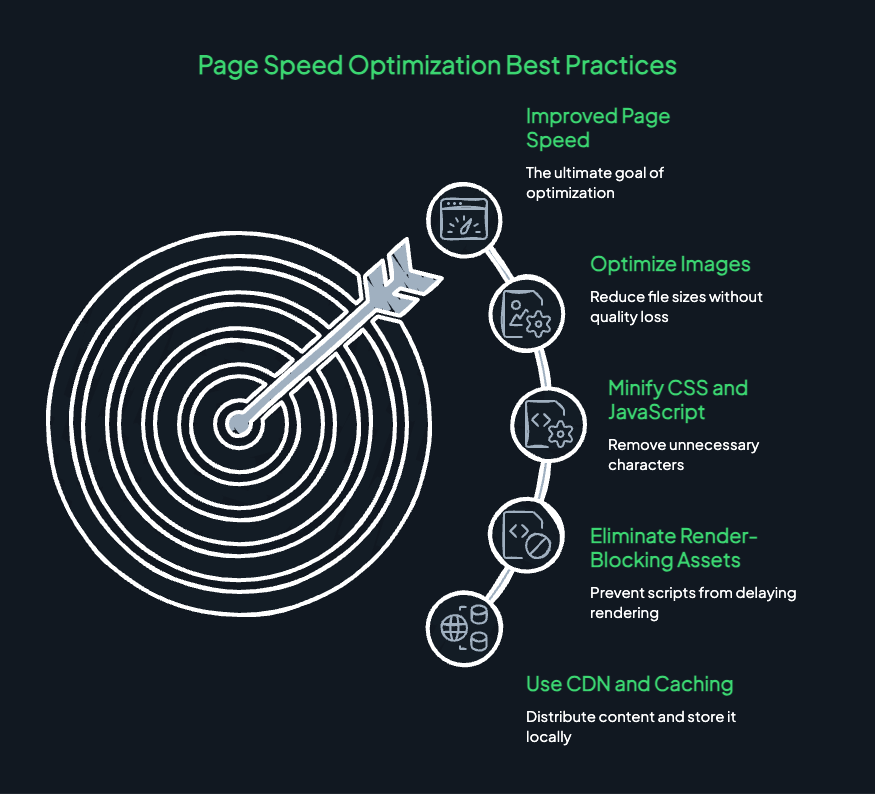
Website Performance Optimization: 7 Ways to Speed Up Your Site
You open a website because you want something. Maybe you are looking for a service, comparing prices, or trying to find an answer to a question.
The page starts loading.
You wait a little longer.
Still nothing useful appears, so you return to the search results and open another website.
That small moment can cost a business a potential customer.
Website speed is easy to underestimate because a website may appear perfectly fine on the owner’s computer. But visitors can have different devices, internet connections, browsers, and expectations. A page that feels quick in the office might be frustrating for someone browsing on a phone with a slower connection.
This is why website performance optimization deserves attention. It helps your website load and respond more efficiently, making it easier for visitors to read content, explore services, and complete important actions.
The good news is that improving performance does not always require rebuilding your entire website. Often, the best results come from identifying a few specific problems and fixing them properly.
Let’s look at seven practical ways to make your website faster and more reliable.
What Is Website Performance Optimization?
Website performance optimization is the process of improving how quickly and smoothly a website loads, responds to user actions, and displays its content.
Performance depends on several factors, including image sizes, server response times, JavaScript, CSS, caching, third-party scripts, and the way a page is structured.
For example, a website might have excellent content but take too long to display its main image. Another might load quickly but shift its layout while visitors are trying to click a button.
Both experiences can be improved.
Performance optimization is not simply about chasing the highest possible speed score. It is about making the website feel responsive, stable, and usable under realistic conditions.
That means measuring actual performance, identifying the biggest problems, and prioritising improvements that make a meaningful difference.
1. Optimize Images Without Making Them Look Poor
Images can make a website more engaging, but oversized image files can slow down page loading.
Imagine a service page displaying a large photograph that is several megabytes in size even though the image appears only a few hundred pixels wide on a mobile screen.
The visitor’s browser may need to download far more data than necessary.
Start by reviewing the images on your most important pages. Resize each image to suit its actual display dimensions and compress it to reduce unnecessary file size.
Modern formats such as WebP and AVIF can help reduce image weight, depending on the image and compression settings.
A few practical improvements include:
- Resize images before uploading them.
- Use appropriate compression settings.
- Choose modern image formats where supported.
- Provide responsive image sizes for different screens.
- Avoid loading large images when a smaller version is sufficient.
- Lazy-load suitable images that appear further down the page.
Be careful with lazy loading. Your main above-the-fold image, particularly the largest visible content element, should generally not be delayed unnecessarily.
Also, compression should not destroy image quality. Blurry product photographs and poorly rendered service images can make a business look less professional.
The goal is to deliver the right image at the right size without making visitors wait for unnecessary data.
2. Improve Your Website’s Largest Content Element
When someone opens a page, the most prominent content should appear promptly.
This could be a headline, a large image, or a substantial block of text. Web performance measurements refer to this as Largest Contentful Paint, or LCP.
A slow LCP can make a website feel unfinished, even if other parts of the page are already available.
Several issues can contribute to a slow LCP:
- Slow server response.
- An oversized main image.
- Render-blocking CSS or JavaScript.
- Delayed loading of important resources.
- Unnecessary redirects before the page appears.
Start by identifying which element is responsible for the LCP measurement. Then investigate why that element takes too long to display.
For example, if the main image is responsible, resizing and compressing it may help. If the server responds slowly, image changes alone will not solve the underlying problem.
Google’s PageSpeed Insights can help you review performance data and identify possible improvements.
As a useful reference, Google’s current Core Web Vitals guidance considers an LCP of 2.5 seconds or less a good result when measured at the 75th percentile of page visits.
Do not assume that every page has the same problem. Check important page types individually, such as the homepage, service pages, blog posts, and product pages.
3. Reduce Unnecessary JavaScript and CSS
Your website needs CSS to control its appearance and JavaScript to support interactive features. The problem begins when pages load more code than they actually need.
A business website might contain several plugins, animation libraries, tracking scripts, chat widgets, and other tools accumulated over time.
Some are useful. Others may no longer serve a meaningful purpose.
Too much unnecessary code can delay rendering, increase download sizes, and consume processing power on visitors’ devices.
Review the scripts and stylesheets loaded on your important pages.
Consider removing unused plugins, eliminating duplicate functionality, and loading page-specific resources only where they are required.
Developers may also use techniques such as minification, deferred script loading, and code splitting where appropriate.
However, do not apply every optimization automatically. Changing script loading behaviour can break menus, forms, analytics, or other features if dependencies are not handled correctly.
Test the website after making changes, especially on mobile devices.
A leaner website is not necessarily one with the fewest lines of code. It is one that loads the resources needed to provide a good experience without unnecessary work.
4. Use Browser Caching and Server-Side Caching Properly
Websites frequently serve resources that do not change with every visit.
These may include logos, stylesheets, JavaScript files, and other static assets. Without suitable caching, a returning visitor may need to download the same resources repeatedly.
Browser caching allows eligible resources to be stored locally for a defined period, reducing repeated downloads.
Server-side caching works differently. It can store generated pages or frequently requested data so the server does not need to repeat the same expensive work for every request.
Depending on your website, useful options may include:
- Browser caching for static assets.
- Full-page caching for suitable pages.
- Object caching for frequently accessed data.
- Content delivery networks for distributing eligible resources.
- Appropriate cache invalidation when content changes.
Caching can improve performance, but it must be configured carefully.
For example, a frequently updated product page should not continue showing an old price because its cache has not been refreshed. Private account pages and personalised content also require appropriate cache rules.
If your website runs on WordPress, review your hosting features and existing caching setup before installing another plugin. Multiple overlapping caching tools can create conflicts and make troubleshooting harder.
The objective is to reduce repeated work without serving outdated or inappropriate content.
5. Check Hosting and Server Response Times
Sometimes, the main performance problem is not on the page itself. It is the time your server takes to begin responding.
Your website’s hosting environment influences how efficiently requests are processed. Available CPU and memory, storage performance, database activity, network conditions, and server configuration can all play a role.
A website may perform well when traffic is low but become slow when many visitors arrive together.
Before upgrading your hosting plan, investigate the actual cause.
Check whether the server response is consistently slow, whether database queries are taking too long, and whether resource usage rises sharply during busy periods.
You may find that a database improvement or a better caching configuration is enough. In other situations, additional server resources or a different hosting arrangement may be justified.
If you are comparing hosting options, explore the resources and services available through HiveRift US and evaluate them against your website’s actual requirements.
Avoid assuming that the most expensive hosting plan will automatically make your website fast. A poorly optimised website can remain slow on powerful infrastructure.
Choose hosting based on workload, reliability needs, technical requirements, and measurable performance.
6. Improve Mobile Performance and Page Stability
A website should not become difficult to use simply because someone opens it on a phone.
Mobile devices may have less processing power than desktop computers, and visitors may be using slower or less consistent network connections. Large scripts, heavy images, and complex page layouts can make these differences more noticeable.
Start by testing your important pages on real mobile devices or through suitable browser testing tools.
Pay attention to how quickly the main content appears, whether menus respond promptly, and whether buttons can be tapped comfortably.
Also check whether page elements move unexpectedly while the page loads.
This is measured by Cumulative Layout Shift, or CLS. Unexpected movement can cause users to tap the wrong button or lose their place while reading.
To reduce layout shifts:
- Reserve space for images and embedded content.
- Specify image dimensions where appropriate.
- Avoid inserting banners above existing content without reserving space.
- Load fonts carefully to reduce disruptive layout changes.
- Check advertisements and third-party widgets for unexpected movement.
Google considers a CLS score of 0.1 or less good at the 75th percentile of page visits.
The point is not to obsess over scores. It is to prevent avoidable delays and movement that make the website frustrating to use.
7. Measure Performance Regularly Instead of Guessing
Website performance optimization works best when decisions are based on evidence.
A page may feel slow because of an oversized image, but the real issue could be a third-party script or a slow database query. Without measurement, you may spend time fixing the wrong thing.
Use a combination of field data and diagnostic testing where available.
Field data reflects the experience of real visitors. Laboratory tests provide controlled conditions that help you investigate specific problems. Both can be useful, but they answer different questions.
Useful measurements include:
- Largest Contentful Paint (LCP): How quickly the main visible content appears.
- Interaction to Next Paint (INP): How quickly the page responds visually after user interactions.
- Cumulative Layout Shift (CLS): How much unexpected layout movement occurs.
- Server response time: How long the server takes to begin responding.
- Page weight: How much data the browser needs to download.
- Error rates: Whether performance problems coincide with failed requests or broken features.
You can use PageSpeed Insights for performance diagnostics and Chrome for Developers’ Web Vitals guidance to understand the main user-experience metrics.
Test your homepage and your most important landing pages first. Record the results, make a focused change, and measure again.
A website that scores well in a single test is not necessarily fast for every visitor. Look for consistent improvements across relevant pages and real-world usage.
Common Website Performance Mistakes to Avoid
Performance improvements can backfire when they are made without understanding how the website works.
Avoid these common mistakes:
Installing multiple optimization plugins without checking compatibility. Overlapping features may create conflicts rather than improve speed.
Compressing every image indiscriminately. Excessive compression can damage image quality, particularly for products and portfolio work.
Removing scripts without testing. Menus, forms, tracking, and other functions may stop working.
Upgrading hosting before identifying the bottleneck. More resources may not fix inefficient code or unnecessarily heavy pages.
Ignoring third-party tools. Chat widgets, external fonts, advertising scripts, and embedded content can affect loading and interaction.
Testing only on a desktop. Mobile visitors may experience very different performance.
Treating one speed score as the entire goal. Real users, important interactions, stability, and reliability matter too.
A measured approach is safer and usually more useful than changing everything at once.
How Often Should You Review Website Performance?
There is no universal schedule that suits every website, but performance should be reviewed whenever meaningful changes are made.
For example, check important pages after a redesign, a hosting migration, the installation of a major plugin, or the addition of new tracking and marketing tools.
High-traffic business websites may also benefit from routine monitoring so emerging problems can be spotted early.
Smaller websites can start with a simpler process: test the most important pages periodically, review them after significant updates, and investigate any reported slowdown.
Keep a record of major changes and their results. That makes it easier to understand which improvements worked and to avoid repeating unsuccessful fixes.
Conclusion: Make Your Website Faster for Real People
A fast website is not just a technical achievement. It makes it easier for visitors to read your content, explore your services, and complete the actions they came to perform.
Website performance optimization begins with understanding where time is being lost. Optimize images, review JavaScript and CSS, configure caching carefully, investigate server response times, improve mobile stability, and measure the results.
You do not need to fix every possible issue in one day. Start with the problems affecting your most important pages, then work through the remaining improvements based on their likely impact.
Most importantly, remember that a speed score is a diagnostic tool, not the final objective. The real goal is a website that feels responsive, works reliably, and gives visitors fewer reasons to leave.
If you are reviewing your business website or planning improvements, visit HiveRift US to explore technology solutions that fit your requirements.
Frequently Asked Questions
1. What is website performance optimization?
Website performance optimization is the process of improving page loading, responsiveness, and stability through changes to images, code, caching, hosting, and other technical elements.
2. How can I check my website speed?
Use Google PageSpeed Insights to review performance diagnostics and available real-user data. Test important pages individually rather than relying on a single homepage score.
3. Does website speed affect SEO?
Performance can contribute to the page experience Google evaluates, including through Core Web Vitals. However, good performance alone does not guarantee higher rankings; relevance, content quality, and other factors also matter.
4. What is a good website loading time?
There is no single loading-time measurement that describes the entire experience. Useful Core Web Vitals targets include LCP of 2.5 seconds or less, INP of 200 milliseconds or less, and CLS of 0.1 or less, measured at the 75th percentile.
5. Can plugins slow down a WordPress website?
Yes. Some plugins add scripts, stylesheets, database queries, or other processing. Their impact varies, so review actual performance and remove unnecessary plugins rather than assuming every plugin causes a problem.
6. Does better hosting automatically make a website faster?
Not always. Hosting can affect server response and available resources, but oversized images, inefficient code, database bottlenecks, and third-party scripts can also cause slowdowns. Identify the main bottleneck before deciding what to upgrade.


