



Web Application Development: How Businesses Can Work Smarter Online
Running a business today often means juggling more tools than anyone would like.
Customer information sits in one spreadsheet. Orders arrive through another platform. Employees exchange updates through messages, while important tasks still depend on manual work. Before long, keeping everything organised becomes a job of its own.
This is one reason businesses are taking a closer look at web application development.
Instead of relying on disconnected tools or repetitive manual processes, a business can use a web application to bring specific activities into one organised digital environment. Depending on the requirements, it might help customers manage their accounts, allow employees to coordinate work, or give business owners a clearer view of everyday operations.
But building an application is not automatically the right answer. The real value comes from identifying a genuine problem and creating something that solves it reliably.
In this guide, we will explain what web application development means, how it differs from a traditional website, which businesses can benefit from it, and what to consider before starting a project.
What Is Web Application Development?
Web application development is the process of planning, designing, building, testing, and maintaining software that people access through a web browser.
Unlike a website that primarily presents information, a web application usually allows users to perform tasks and interact with data.
For example, a website might explain a company’s services, while a web application could let customers book appointments, track requests, update account information, or manage transactions.
The exact functionality depends on the business problem the application is designed to solve.
A web application may include user accounts, dashboards, searchable records, automated workflows, reporting tools, payment functionality, or integrations with other systems. Not every project needs all these features. The best solution is the one that supports the intended users without adding unnecessary complexity.
Website vs. Web Application: What’s the Difference?
The two terms are often used interchangeably, but they describe different primary purposes.
A traditional website generally focuses on sharing information, presenting a brand, publishing content, or helping visitors understand products and services.
A web application focuses more on interaction. Users can submit information, manage records, complete processes, or receive personalised results.
Consider an online education business. Its website might explain available courses, introduce instructors, and answer common questions. A separate web application could allow students to access learning materials, track progress, and manage their accounts.
In practice, the distinction is not always absolute. Modern websites can include interactive features, and web applications can contain informational pages. What matters most is the purpose of the system and what users need to accomplish.
7 Ways Web Application Development Can Help Businesses
1. Reduce Repetitive Manual Work
Some business tasks consume time without requiring much decision-making.
Employees may repeatedly enter the same information, prepare similar reports, send routine updates, or move records between tools. These activities can create unnecessary work and increase the possibility of human error.
A carefully designed web application can automate suitable parts of these workflows.
For instance, a booking application could collect customer details, record appointments, and send confirmation messages when the necessary integrations are available.
The goal is not to remove human involvement from every process. It is to reduce avoidable repetition so people can focus on work that requires attention and judgement.
2. Keep Important Information Organised
When business information is scattered across multiple spreadsheets, emails, and applications, finding the correct record can become difficult.
A web application can provide a central place for relevant information, with access based on user roles and business requirements.
A service company, for example, might use an internal application to manage customer requests, assign tasks, and review progress. Team members can work from a more consistent source of information instead of relying on separate versions of the same document.
However, centralisation needs proper planning. Data quality, permissions, backups, and security still matter.
3. Improve the Customer Experience
Customers increasingly expect convenient digital experiences.
They may want to book a service outside business hours, check the status of a request, update their details, or access information without contacting support for every small question.
A web application can make these activities easier by giving customers access to relevant features through a browser.
For example, a service business might offer a customer portal where users can review requests and find important updates. An educational organisation might provide a portal for course resources and progress information.
When designed well, these features can make the customer journey clearer and reduce unnecessary back-and-forth communication.
4. Support Better Business Decisions
Making decisions without reliable information can lead to wasted effort.
A web application can collect relevant operational data and present it through dashboards, summaries, or reports. Depending on its purpose, this could help managers understand workload, identify recurring problems, or review the progress of important activities.
The usefulness of these insights depends on the quality of the underlying data and whether the application measures the right things.
A dashboard filled with numbers is not automatically valuable. The best reporting features answer practical questions and help people decide what to do next.
5. Make Collaboration Easier
Teams often struggle when tasks, responsibilities, and updates are spread across different communication channels.
A web application can create a shared workspace for specific processes, allowing authorised users to view relevant information and understand what needs attention.
This might involve task assignments, approval workflows, shared records, or status updates.
The application should fit the way the team works. If it introduces unnecessary steps or duplicates existing tools without a clear benefit, employees may find it difficult to adopt.
6. Adapt as the Business Grows
A process that works for ten customers may become difficult to manage when the business serves hundreds.
As transaction volumes, employee numbers, and operational needs increase, the tools that once seemed sufficient may become restrictive.
A well-planned application can provide room to add functionality as requirements evolve. That does not mean every possible future feature should be built at the beginning.
A more practical approach is to establish a reliable foundation, launch the essential functionality, and expand based on real usage and business priorities.
7. Connect Different Business Systems
Businesses frequently use separate platforms for accounting, customer management, payments, communication, and reporting.
Where supported, integrations can allow these systems to exchange relevant information instead of requiring employees to move data manually.
For example, an application might connect a customer-facing workflow with a payment service or send relevant information to an existing business system.
Integrations require careful consideration of permissions, data formats, reliability, and ongoing maintenance. Before development begins, identify which systems genuinely need to communicate and what information should be shared.
Common Types of Web Applications
Web applications can serve very different purposes. Understanding the available categories can help you decide whether your business needs a custom solution.
Customer Portals
Customer portals give users a secure place to access information or complete specific tasks. Common examples include viewing service requests, managing account details, downloading documents, and checking updates.
Booking and Appointment Systems
These applications help users select available appointments, submit booking information, and manage reservations. More advanced systems may include reminders, staff availability, and payment integration.
Business Management Applications
Internal applications can support workflows such as task allocation, record management, approvals, reporting, and operational coordination.
eCommerce Applications
Online shopping experiences can include product discovery, customer accounts, shopping carts, checkout processes, order tracking, and inventory-related functionality.
Learning Management Applications
Educational platforms may allow learners to access lessons, complete assessments, track progress, and communicate with instructors.
Data and Reporting Applications
These applications organise information and present useful summaries, helping teams monitor activity, review performance, and identify patterns.
The right category depends on the actual problem you need to solve. A business should not build a complex custom application simply because similar companies use one.
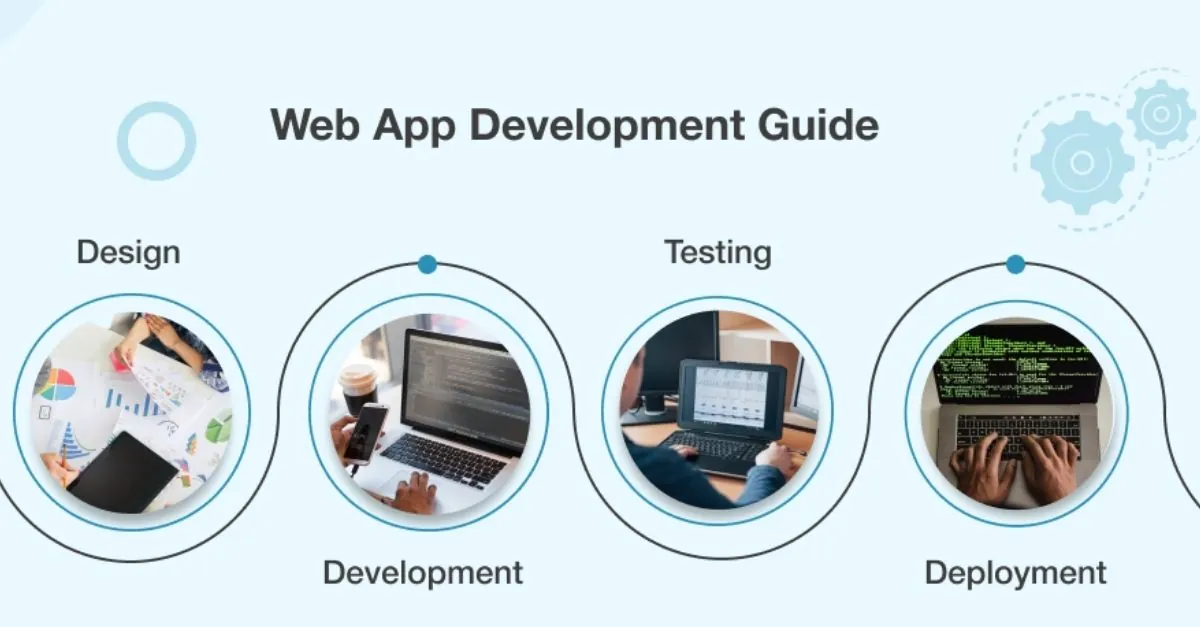
The Web Application Development Process
Developing a useful application requires more than writing code. A structured process helps ensure that the final product meets its intended purpose.
Step 1: Identify the Problem
Begin with the task or frustration that led you to consider an application.
Are customers struggling to access information? Are employees spending too much time updating records? Is an important workflow difficult to track?
Describe the problem clearly before discussing features. This helps prevent the project from becoming a collection of ideas without a central purpose.
Step 2: Define the Requirements
Identify the people who will use the application and what each group needs to accomplish.
List the essential features, the information the application must handle, the systems it may need to connect with, and any relevant security or compliance requirements.
Separate must-have features from improvements that can wait. This keeps the initial project focused and makes budgeting more manageable.
Step 3: Plan the User Experience
Before development begins, map out the main user journeys.
Consider what users see when they first open the application, how they navigate between tasks, what happens when they submit information, and how errors are explained.
Wireframes and prototypes can help stakeholders review the structure before substantial development work begins.
The aim is to make important actions understandable, predictable, and accessible.
Step 4: Choose the Technology
Technology decisions should follow the application’s requirements rather than trends.
The development team may need to consider the programming languages, application framework, database, hosting environment, authentication approach, integrations, and expected usage.
The best choice balances functionality, security, maintainability, performance, and the available budget.
It should also account for who will maintain the application after launch.
Step 5: Develop the Application
Development usually involves building the interface users interact with, the underlying logic, the data storage system, and any required integrations.
Depending on the project, different parts may be developed and tested in stages.
Regular reviews are helpful because they allow stakeholders to confirm that the application is solving the intended problem before too much time is invested in the wrong direction.
Step 6: Test for Quality and Security
Testing should cover more than whether buttons work.
The application should be checked for usability, validation errors, performance, mobile compatibility where relevant, permissions, and the reliability of important workflows.
Security testing should address risks such as unauthorised access, unsafe data handling, and vulnerable dependencies.
For applications that handle personal or financial information, privacy and applicable legal requirements should be considered from the planning stage.
Step 7: Launch and Maintain
Before launch, prepare the production environment, confirm backups and recovery procedures, and make sure monitoring is in place.
Users may also need instructions or training, especially when the application changes an established workflow.
After launch, monitor errors, gather feedback, apply security updates, and address problems as they appear. Software requires ongoing care, even when the initial development project is complete.
How Much Does Web Application Development Cost?
The cost depends on what the application needs to do and how complex it is to build and maintain.
A relatively simple application with a limited set of screens and workflows will generally require less work than a platform involving multiple user roles, complex business rules, third-party integrations, and sensitive data.
Factors that influence the budget include:
- The number and complexity of features.
- User interface and experience design.
- Backend logic and database requirements.
- Authentication, permissions, and security measures.
- Integrations with existing services.
- Testing, deployment, and documentation.
- Ongoing hosting, maintenance, and technical support.
It is also important to budget for changes after launch. Users may reveal needs that were not obvious during the planning stage, and business requirements can evolve.
A sensible way to manage costs is to start with a clearly defined minimum viable product (MVP). This version includes the essential features needed to solve the main problem. Additional functionality can be introduced once the team has feedback and evidence about what users actually need.
Custom Web Application or Ready-Made Software?
Not every business needs a custom application.
Ready-made software can be a practical choice when its existing features fit your workflow and its pricing, security arrangements, and integration options meet your requirements.
Custom web application development may be worth considering when your processes are distinctive, existing products cannot meet essential requirements, or you need greater control over specific workflows and integrations.
Before making a decision, compare the total cost of ownership rather than looking only at the initial development price. Include subscriptions, customisation, training, integration work, maintenance, and the cost of changing platforms later.
The right solution is the one that meets your needs reliably without introducing unnecessary expense or complexity.
Common Mistakes to Avoid
Even a technically impressive application can fail to deliver value if the project is poorly planned.
Building too many features at once. A large initial scope can increase cost and delay the launch. Prioritise the functionality that solves the main problem.
Ignoring user feedback. An application that makes sense to its developers may still be confusing for the people expected to use it. Test early and refine the experience.
Treating security as an afterthought. Authentication, permissions, secure data handling, backups, and updates should be considered throughout development.
Choosing technology based only on popularity. A fashionable framework is not necessarily the right fit for your requirements or maintenance resources.
Forgetting ongoing costs. Hosting, monitoring, support, and security updates continue after the initial project is finished.
Launching without a clear success measure. Decide how you will evaluate the application, whether through reduced manual effort, fewer errors, improved task completion, or another relevant business outcome.
Frequently Asked Questions
What is the difference between a web application and a mobile application?
A web application generally runs in a web browser and can be accessed across compatible devices. A native mobile application is developed for a particular mobile operating system and installed on a device. The right choice depends on the required features, device capabilities, user experience, and budget.
Do small businesses need custom web applications?
Not necessarily. Many small businesses can operate effectively with existing software. A custom application becomes worth exploring when recurring problems cannot be solved adequately with available tools or when a tailored workflow provides a clear business benefit.
How long does web application development take?
The timeline depends on the application’s complexity, required integrations, design needs, testing requirements, and decision-making process. A small application may take substantially less time than a complex platform. A defined scope and staged delivery plan make timelines easier to estimate.
Are web applications secure?
They can be designed with strong security controls, but no application is automatically secure. Security depends on implementation, access controls, data handling, infrastructure, maintenance, monitoring, and how vulnerabilities are addressed over time.
Can a web application integrate with existing software?
Yes, when suitable APIs or other supported integration methods are available. Compatibility, permissions, costs, data formats, and vendor restrictions should be evaluated before the integration is included in the project scope.
Final Thoughts
Web application development can help businesses organise information, simplify repetitive work, improve customer interactions, and build more consistent digital processes.
But the strongest projects do not begin with a long list of features. They begin with a clear understanding of a problem and a realistic plan for solving it.
Before investing in development, review the tools you already use, speak with the people who will use the application, and identify the outcomes that would make the project worthwhile. Start with the essentials, test the solution with real users, and improve it as your requirements become clearer.
If you are exploring ways to improve your business’s digital presence or online capabilities, visit HiveRift US to explore its website and digital solution offerings.
The goal is not simply to build another piece of software. It is to create a useful digital tool that makes everyday work easier and supports the business as it grows.


