



Software Licensing: 7 Smart Tips for Businesses
Buying software seems straightforward until you start reading the terms.
One plan allows five users. Another charges for every employee. A third looks cheaper but restricts commercial use, while an open-source alternative comes with obligations your team may not have considered.
These details matter because software licensing affects more than the price you see on a website. It can determine who can use the software, how it may be modified, whether it can be redistributed, and what happens when your business grows or changes providers.
For a small business, a licensing mistake can mean unexpected expenses, unnecessary subscriptions, or restrictions that interfere with daily operations. For a growing company, the wrong agreement can become even harder to manage across departments, devices, and locations.
The good news is that you don’t need to be a lawyer or software engineer to make a more informed decision.
You need to understand what you’re buying, what the agreement permits, and which conditions could affect your business later.
Let’s look at seven practical ways to approach software licensing more confidently.
What Is Software Licensing?
Software licensing is the legal arrangement that defines how a person or organization is allowed to use a software product.
In many cases, purchasing software does not mean purchasing ownership of the underlying program. Instead, you receive permission to use it under specific terms.
Those terms may cover the number of users, permitted devices, commercial use, copying, modification, redistribution, updates, support, and subscription duration.
For example, a company might subscribe to a project management tool for 20 employees. If the agreement charges per user, adding another 15 employees could increase the monthly bill. If the company later stops paying, access may end or certain features may become unavailable, depending on the agreement.
Software licensing can apply to desktop applications, cloud platforms, mobile apps, development tools, operating systems, and custom software.
Before choosing any product, make sure its licensing model fits the way your team actually works.
1. Understand the Different Types of Software Licenses
Not all software licenses grant the same rights. Understanding the basic categories can help you compare products more accurately.
Proprietary software licenses
Proprietary software is controlled by its owner or publisher. Users receive specific permissions under the license agreement but generally cannot freely modify or redistribute the software.
Many commercial accounting tools, design applications, and business platforms use proprietary licensing.
Open-source software licenses
Open-source licenses allow users to access source code and exercise certain rights, subject to the license’s conditions.
However, open source does not automatically mean unrestricted use. Some licenses impose obligations when software is modified, distributed, or incorporated into other products.
The Open Source Initiative’s license resources are a useful starting point for understanding common open-source licenses.
Subscription licenses
Subscription-based software typically requires recurring payments for continued access or use. Depending on the product, the subscription may include hosting, updates, support, or additional services.
Perpetual licenses
A perpetual license generally grants ongoing rights to use a particular software version, subject to the agreement. Updates, technical support, and access to online services may require separate payments.
These categories can overlap. A proprietary application, for instance, can be sold through either a subscription or a perpetual license.
The important question is not simply which category sounds best. It is whether the actual terms meet your business requirements.
2. Calculate the Total Cost, Not Just the Advertised Price
Software pricing can look attractive at first and become considerably more expensive over time.
A product advertised at $20 per user each month may cost $1,000 monthly if 50 employees need access. Additional charges for storage, integrations, premium features, or support could increase the total.
Before committing, calculate the expected cost across a realistic period.
Consider these expenses:
- Initial purchase or setup fees
- Monthly or annual subscription charges
- Additional users or devices
- Premium features and usage limits
- Integration and implementation costs
- Training and migration expenses
- Support and maintenance
- Renewal price changes
Also check whether the agreement automatically renews, whether discounts expire, and what notice is required to cancel.
For example, a discounted annual plan might be cheaper than paying monthly, but only if your business expects to use the software throughout the year.
A perpetual license might suit a stable, long-term workflow, but it could require separate spending on upgrades and maintenance.
Compare the total expected cost over two or three years, not just the amount due today.
This simple exercise can reveal which option offers better value for your organization.
3. Check How Many Users and Devices Are Allowed
A license that works perfectly for a small team may become restrictive when additional employees join.
Some software is licensed per named user. Other products charge per device, concurrent user, organization, or amount of usage. Cloud platforms may combine several of these models.
Read the agreement carefully before sharing access across departments or locations.
Questions worth asking include:
- Can one employee use the software on multiple devices?
- Are contractors and temporary staff covered?
- Can employees work remotely?
- Is shared access permitted?
- What happens when an employee leaves?
- Can licenses be transferred to another employee?
- Are there limits on simultaneous sessions?
Consider a design agency with eight employees. If its agreement permits only five named users, sharing one account across the entire team may violate the terms and create security problems.
The better solution might be to purchase additional seats, choose a different plan, or evaluate an alternative with more suitable permissions.
Review user counts periodically. Removing access for former employees and reclaiming unused licenses can reduce costs while helping protect business accounts.
4. Read the Rules for Commercial Use and Modification
This point is especially important for businesses that create products, build websites, or develop software for clients.
A tool may permit personal use but restrict commercial activity under a particular license. A design asset may allow use on one website but prohibit redistribution as a standalone file. A development library may have conditions that affect how it can be included in a distributed product.
Never assume that being able to download or install something automatically gives you every right you need.
Before using a software product or component commercially, confirm:
- Whether business use is permitted
- Whether modifications are allowed
- Whether redistribution is permitted
- Whether attribution is required
- Whether source code must be disclosed in particular circumstances
- Whether the license covers client projects
- Whether additional permissions are needed for embedded assets
For open-source components, check the specific license rather than relying on the general label “open source.”
For commercial products, review the applicable end-user license agreement, developer terms, or commercial-use policy.
If your team is distributing software to customers or building a commercial product around third-party components, legal review may be worthwhile. The consequences of noncompliance can be more expensive than the time spent checking the terms beforehand.
5. Protect Your Business When Buying Custom Software
Off-the-shelf software is only part of the picture. Businesses that commission custom applications also need to understand software ownership and licensing.
Suppose you hire a development company to build an internal business management system. The agreement should clearly explain what your company will own, what rights it will receive, and which third-party components are included.
Depending on the contract, the developer may transfer certain intellectual property rights, grant a license to use the finished application, or retain ownership of reusable components.
These arrangements are not interchangeable.
Before signing a development agreement, clarify:
- Who owns the custom-developed source code
- Whether source code will be delivered
- Whether you can modify the software later
- Whether another developer can maintain it
- Who owns pre-existing tools or reusable components
- Which third-party libraries and services are included
- Whether ongoing maintenance requires a separate contract
- What happens if the development relationship ends
For example, a company may receive permission to use a custom application without receiving unrestricted rights to resell it or distribute its source code.
That arrangement might be perfectly suitable for an internal tool, but it could be unsuitable for a software product the company intends to commercialize.
If you’re planning a custom application, discuss these rights before development begins. You can explore HiveRift US as a starting point for understanding software and web development options for business projects.
The precise ownership and licensing terms should be documented in the signed agreement.
6. Review Data Access, Privacy, and Exit Conditions
A software license can affect what happens to your business information when a subscription ends or you switch providers.
This matters particularly when the application stores customer details, invoices, project records, employee information, or operational data.
Before committing, understand how your data will be handled throughout the relationship and after it ends.
Check whether the provider allows you to export your information in a usable format. Confirm how long you can retrieve data after cancellation and whether export or migration fees apply.
You should also review the agreement’s provisions on data retention, deletion, confidentiality, and security responsibilities.
For cloud software, investigate the provider’s privacy documentation and any applicable data processing agreement. Make sure the arrangement aligns with your business obligations and the laws relevant to your organization.
A few questions can make a substantial difference:
- Can you export your data without unreasonable restrictions?
- Are common file formats supported?
- Will your integrations continue to work if you change plans?
- What happens to stored information after termination?
- Can the provider change important terms or features?
- Is there a practical process for moving to another service?
Think about the exit process before you need it. Switching providers is much easier when you understand your options in advance.
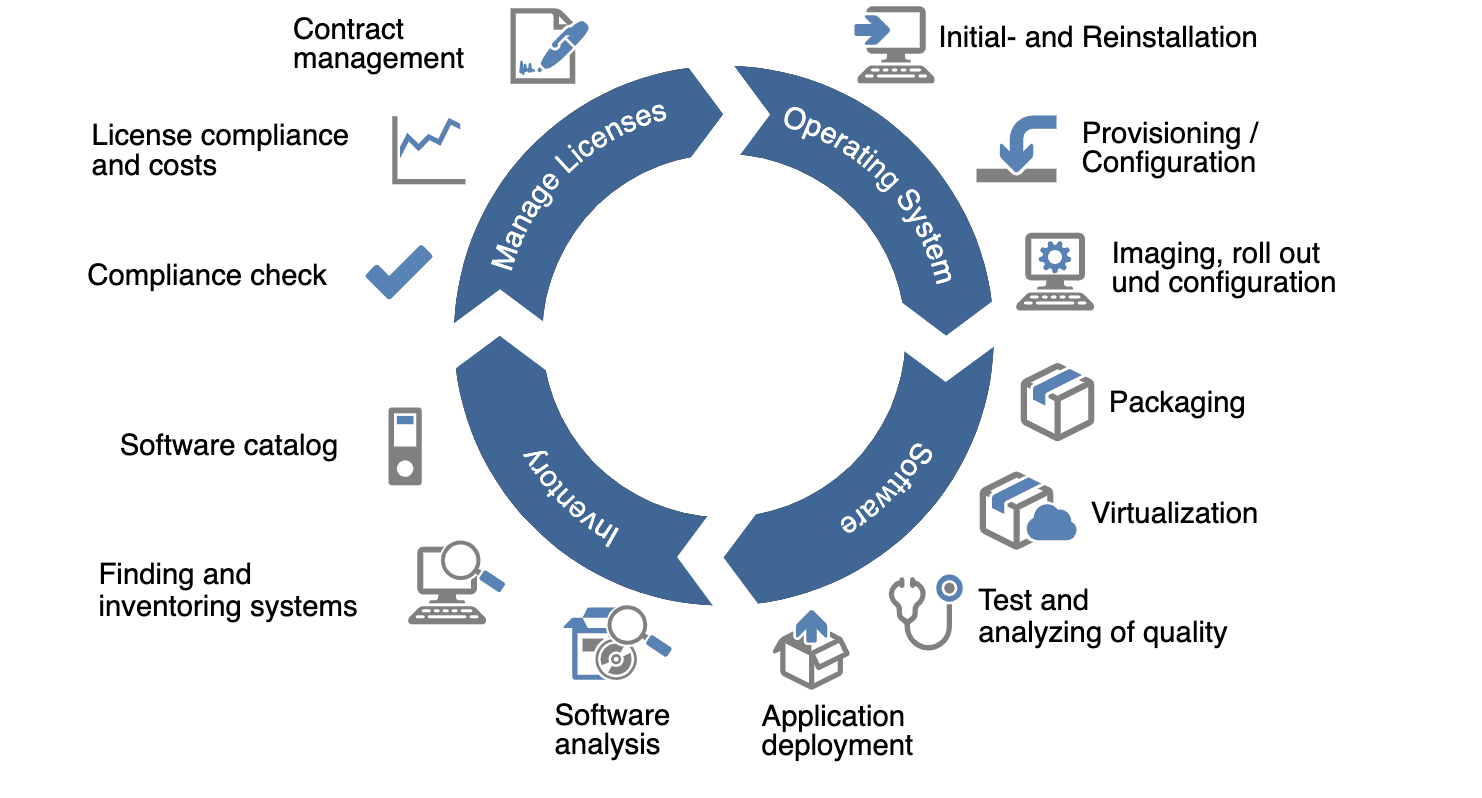
7. Keep a Software License Inventory
Even a small business can accumulate more software licenses than it realizes.
One department might subscribe to a project management platform, another might purchase design tools, and individual employees might install applications that later become essential to company operations.
Without a central record, renewals get missed, unused subscriptions continue billing, and nobody knows whether the business has enough licenses for its current team.
A simple software inventory can prevent these problems.
For each product, record:
- Software name and publisher
- License type and agreement location
- Number of purchased and assigned licenses
- Responsible department or owner
- Purchase date and renewal date
- Subscription cost
- Support or maintenance expiry
- Cancellation notice period
- Data export and termination requirements
A spreadsheet may be enough for a small organization. Larger businesses may benefit from dedicated software asset management tools.
Assign someone responsibility for reviewing the inventory. A quarterly check can help identify unused accounts, duplicate subscriptions, upcoming renewals, and changes in licensing requirements.
Keep purchase records and relevant agreements in a secure, accessible location. This also makes it easier to answer questions during an audit or internal review.
The goal is not to create paperwork for its own sake. It is to make software spending and usage visible so decisions are easier to manage.
Common Software Licensing Mistakes to Avoid
Some licensing problems arise because the terms are complicated. Others happen because nobody checks them at all.
Watch out for these common mistakes:
- Assuming a paid product can be used without restrictions: Payment does not automatically grant every possible right.
- Treating open source as obligation-free: The exact license may impose conditions.
- Sharing accounts without checking permissions: This can violate user limits and weaken account security.
- Ignoring renewal clauses: Automatic renewals can create unwanted expenses.
- Overlooking custom software ownership: Payment for development does not necessarily settle every intellectual property question.
- Forgetting third-party components: A custom application may include separate licenses for libraries, fonts, images, or other assets.
- Failing to plan for cancellation: Limited export options can make switching providers difficult.
A short review before purchase can prevent weeks of unnecessary troubleshooting and expense later.
How to Choose the Right Software License for Your Business
Start with your business requirements rather than the available pricing plans.
Determine how many people need access, which features are essential, whether the software will be used commercially, and how important customization and portability are.
Then compare the actual license terms, total cost, support arrangements, renewal conditions, and exit options.
For custom development, clarify ownership and usage rights in the contract. For open-source software, review the specific license and its obligations. For cloud subscriptions, understand user limits, data handling, and what happens when access ends.
If the consequences of a licensing decision could affect a core product, intellectual property, or a regulated business process, obtain appropriate professional advice before committing.
A good license should support the way your business operates without creating avoidable restrictions or financial surprises.
Conclusion
Software licensing may not be the most exciting part of choosing a business tool, but it can have a lasting effect on your budget, flexibility, and legal responsibilities.
The right approach is to understand the license type, calculate the full cost, verify user permissions, review commercial-use rights, clarify custom software ownership, and plan for data portability.
Just as importantly, keep track of the licenses your business already uses. A little organization can prevent unnecessary renewals and help you make better purchasing decisions.
Before approving your next software purchase, take time to read the terms that govern it. The best software choice is not simply the product with the most features. It is the one your business can use confidently, affordably, and within the rights the agreement provides.
Frequently Asked Questions
1. What does software licensing mean?
Software licensing defines the permissions and conditions under which someone may use a software product. Depending on the agreement, it may specify user limits, commercial-use rights, modification rules, subscription duration, and redistribution permissions.
2. What is the difference between a software license and a subscription?
A software license defines the rights granted to the user. A subscription is a payment and access model that often provides continued use while payments remain current. Subscription software also operates under a license or service agreement.
3. Is open-source software free for commercial use?
Some open-source software can be used commercially without a purchase fee, but the specific license determines the applicable conditions. Certain licenses include requirements relating to attribution, distribution, source code, or notices.
4. Does buying custom software mean my business owns the source code?
Not automatically. Ownership and access depend on the development agreement and applicable law. The contract should clearly state whether source code and intellectual property rights are transferred, licensed, or retained by the developer.
5. What happens when a software subscription expires?
Depending on the agreement, access may stop, features may become restricted, or stored data may become available only for a limited period. Review the provider’s renewal, cancellation, data export, and retention terms before subscribing.
6. How can a small business avoid paying for unused software licenses?
Maintain an inventory of subscriptions and assigned users, review usage regularly, remove access when employees leave, and check renewal dates. Before reducing seats, confirm the provider’s minimum requirements and any contract restrictions.
7. Should a business have a lawyer review software licensing terms?
Not every routine purchase requires legal review. However, professional advice is sensible when an agreement involves valuable intellectual property, custom software ownership, redistribution, significant financial commitments, sensitive data, or complex compliance obligations.


