



Serverless Computing: 7 Smart Benefits for Businesses
Imagine launching a new online service without spending days configuring servers, planning infrastructure capacity, or worrying about whether your systems can handle a sudden increase in traffic. Your development team can focus on building the application while a cloud provider takes care of much of the underlying infrastructure.
That is the idea behind serverless computing.
Despite the name, servers are still involved. The difference is that your business doesn’t need to manage the server infrastructure in the traditional way. A cloud provider handles much of the provisioning, maintenance, and scaling, allowing your team to concentrate on the code and business logic that make the application useful.
For startups, growing companies, and established businesses modernizing their software, this approach can make certain workloads easier to build and operate. However, it isn’t automatically cheaper, simpler, or better for every application.
Let’s explore how serverless computing works, where it offers real advantages, and what businesses should consider before adopting it.
What Is Serverless Computing?
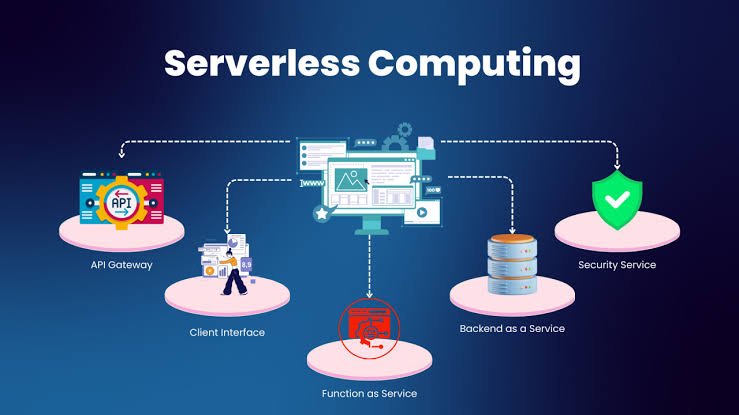
Serverless computing is a cloud computing model in which developers run code or applications without directly managing the underlying servers.
Instead of provisioning and maintaining virtual machines for every workload, a team can use a managed cloud service that runs code in response to events, requests, schedules, or other triggers.
For example, an online store might use serverless functions to process a new order, send a confirmation email, resize an uploaded product image, or update inventory after a purchase.
The cloud provider manages much of the infrastructure required to execute these tasks. Depending on the service, billing may be based on requests, execution time, resource consumption, or other usage measures.
Common examples include AWS Lambda, Azure Functions, and Google Cloud Run.
The term covers several related approaches, including function-based computing and managed application runtimes. Their deployment models, scaling behavior, pricing, and configuration requirements differ, so it’s important to compare the actual services rather than treating every serverless platform as identical.
7 Benefits of Serverless Computing for Businesses
1. Spend Less Time Managing Infrastructure
Running applications on traditional infrastructure involves more than writing code. Teams may need to maintain operating systems, configure servers, apply patches, manage capacity, and monitor infrastructure health.
Serverless services shift much of that operational work to the cloud provider.
This doesn’t eliminate infrastructure responsibilities altogether. Developers still need to configure permissions, manage application settings, monitor failures, and maintain their code. The provider simply takes responsibility for more of the underlying platform.
For a small development team, that difference can be valuable.
Consider a company building a customer feedback tool. Rather than maintaining a dedicated server just to process submitted forms, the team could use a managed function that validates each submission and stores the result.
The developers can devote more time to improving the customer experience instead of handling routine server administration.
2. Scale With Changing Demand
Application traffic rarely follows a perfectly predictable pattern.
A marketing campaign might generate a sudden burst of website activity. An online store may receive significantly more orders during a holiday sale. A business application might remain quiet for hours before processing a large batch of requests.
Serverless platforms can automatically adjust execution capacity in response to demand, subject to the service’s limits, configuration, and quotas.
This can reduce the need to estimate server capacity far in advance.
For example, a business that collects customer enquiries through its website could process submissions using a serverless function. As enquiry volume changes, the platform can adjust execution capacity without the team manually adding individual servers.
There is an important qualification: scaling is not unlimited. Account quotas, database connection limits, concurrency settings, downstream services, and regional capacity can still create bottlenecks.
Businesses should test their applications under realistic traffic conditions before relying on automatic scaling during critical events.
3. Pay for Usage Instead of Maintaining Idle Capacity
Traditional infrastructure may require businesses to pay for servers that remain available even when application demand is low.
Some serverless services use consumption-based pricing, charging according to factors such as requests, execution duration, memory allocation, or resource usage. This can be attractive when workloads are intermittent.
Imagine a reporting function that runs only when employees request a report. A usage-based service may be more economical than maintaining a dedicated server solely for that task.
However, serverless computing does not guarantee lower costs.
A continuously busy application may be cheaper on a carefully optimized virtual machine or container platform. Additional charges can also arise from database access, network traffic, logs, storage, API gateways, and other connected services.
Before choosing a platform, estimate costs using expected traffic, average execution time, resource requirements, and related infrastructure expenses.
The most useful comparison is the total cost of running the application, not just the advertised price of executing a function.
4. Develop and Release Features Faster
Serverless computing can help developers break certain application tasks into smaller, independently deployable components.
Instead of building every feature into one large application, a team may create separate functions for processing payments, sending notifications, handling uploads, or validating incoming data.
This can make individual components easier to develop and update when the architecture is designed carefully.
For instance, a booking platform might use one function to confirm a reservation and another to send a confirmation message. The notification component could be updated without redesigning the entire application.
Smaller components also make it easier to assign specific responsibilities to different parts of the system.
But splitting everything into separate functions is not always a good idea. Excessive fragmentation can introduce complicated dependencies, more monitoring requirements, and additional network communication.
The objective is to simplify the application where it matters, not to turn every small operation into a separate service.
5. Connect Business Applications More Easily
Businesses often rely on several systems that need to exchange information. A website may connect to a CRM, an inventory platform, a payment gateway, and an email marketing service.
Serverless functions can act as lightweight connectors between these applications.
For example, when a customer completes a purchase, an event could trigger a function that updates a business system, sends an order notification, or starts a fulfilment workflow.
This can reduce repetitive manual work and help information move between applications more consistently.
Serverless functions are particularly useful for event-driven tasks, including:
- Processing website form submissions
- Sending notifications after a defined event
- Transforming uploaded files
- Synchronizing selected business records
- Running scheduled reports
- Processing messages from queues
The integration still needs appropriate error handling. If an external service is unavailable, the application should have a defined way to retry, record, or route the failed operation rather than silently losing the request.
Businesses that need more customized connections can explore HiveRift for information about its digital solutions and development services.
6. Support Background Tasks Without Keeping a Dedicated Server Busy
Not every application task needs to happen while a customer waits on a page.
Some operations can run in the background, such as generating reports, processing uploaded documents, resizing images, or sending batches of notifications.
Serverless computing can support these workloads through event triggers, queues, scheduled executions, and managed services.
Imagine a website where customers upload product photographs. The application could accept the upload and then trigger a background task to create smaller versions for different screen sizes.
The customer-facing website does not necessarily need to perform all that processing during the initial request.
This separation can improve the design of the application, provided the business handles task status, failures, and completion notifications appropriately.
Background processing also needs realistic time and resource limits. Very long-running or computationally intensive jobs may be better suited to a container, batch-processing service, or another compute platform.
7. Build More Flexible Cloud Applications
Serverless computing encourages businesses to choose managed services for individual application needs rather than managing every infrastructure component themselves.
A company might use serverless functions for event processing, managed storage for files, a hosted database for application data, and a separate service for authentication.
This flexibility can make it easier to select suitable technologies for different tasks.
It can also help a business experiment with new features without committing immediately to a large, fixed infrastructure setup.
However, flexibility requires planning. A system that depends heavily on one provider’s proprietary services may become difficult or expensive to move later.
Businesses should consider portability, data export options, monitoring, deployment automation, and the practical cost of changing providers.
The right architecture balances convenience today with reasonable flexibility for tomorrow.
When Does Serverless Computing Make Sense?
Serverless computing is often a strong option when an application has variable demand, responds to events, or contains independent tasks that don’t require a continuously running server.
<box border=”1px solid” radius=”lg” padding={3} gap={3}>
<title size=”md”>Good Use Cases</title>
<list marker=”bullet” gap={1}>
<list-item>Website form processing and notification workflows</list-item>
<list-item>Image conversion and document processing</list-item>
<list-item>Scheduled jobs and automated reports</list-item>
<list-item>Event-driven integrations between business applications</list-item>
<list-item>API endpoints with variable request volumes</list-item>
<list-item>Background tasks triggered by uploads or transactions</list-item>
</list>
<divider color=”subtle” />
<title size=”md”>Situations That Need More Evaluation</title>
<list marker=”bullet” gap={1}>
<list-item>Applications that run continuously at high utilization</list-item>
<list-item>Workloads requiring specialized hardware or persistent processes</list-item>
<list-item>Tasks that exceed a service’s execution limits</list-item>
<list-item>Systems with strict latency requirements or complex state management</list-item>
<list-item>Applications that depend on software incompatible with the chosen runtime</list-item>
</list>
</box>
A business may also choose a hybrid architecture. For example, the main application could run in containers while selected background jobs use serverless functions.
There is no requirement to move an entire system to one computing model.
What Are the Challenges of Serverless Computing?
Understanding the limitations before implementation can prevent expensive surprises.
Cold Starts and Response Times
Some serverless environments may take additional time to initialize an execution environment after a period of inactivity or when additional capacity is needed. This is commonly called a cold start.
The impact varies by platform, runtime, configuration, and workload. It may be insignificant for a background task but noticeable in an application that requires consistently fast responses.
Measure latency under realistic conditions and investigate available options for reducing startup delays when necessary.
Monitoring and Troubleshooting
An application spread across multiple functions and managed services can be harder to troubleshoot than a single, straightforward application.
A request may pass through an API, a function, a queue, a database, and an external service before completing.
Centralized logging, distributed tracing, clear error messages, and useful alerts help teams understand where failures occur.
Cost Surprises
Usage-based pricing can increase quickly when request volume rises, functions repeatedly retry failed operations, or a poorly designed workflow creates unnecessary calls.
Set budgets, monitor spending, establish alerts, and test failure scenarios. Cost monitoring should be part of the initial implementation rather than something added after the first unexpected bill.
Vendor Dependence
Using provider-specific triggers, databases, permissions, and development tools can make migration more difficult.
This is not necessarily a reason to avoid serverless computing. Managed services can save substantial development and operational effort. The important thing is to understand which dependencies are essential and what moving away from them would involve.
Security and Permissions
Cloud providers manage much of the underlying infrastructure, but businesses remain responsible for application-level decisions.
Functions should have only the permissions they need. Credentials should be managed appropriately, sensitive data should be protected, and dependencies should be maintained.
A serverless architecture can still contain vulnerable code, exposed endpoints, insecure integrations, or incorrectly configured permissions.
How to Get Started With Serverless Computing
A practical implementation begins with a small, well-defined problem rather than a complete application rewrite.
Step 1: Identify a repetitive task. Choose something like processing a form, generating a report, or sending a notification.
Step 2: Estimate workload requirements. Consider expected request volume, execution time, memory needs, data access, and latency expectations.
Step 3: Compare platforms. Review the pricing, runtime support, limits, integrations, monitoring capabilities, and deployment options offered by potential providers.
Step 4: Design for failure. Decide how the system will handle timeouts, duplicate events, failed requests, retries, and unavailable external services.
Step 5: Build a small proof of concept. Implement the selected task and test normal operation, peak demand, and failure scenarios.
Step 6: Monitor performance and costs. Track execution time, errors, request volume, latency, and total service expenses.
Step 7: Expand only when the results justify it. If the initial workflow is reliable and cost-effective, consider applying the same approach to other suitable tasks.
For additional technical guidance, the AWS Lambda documentation explains function-based execution, while the Google Cloud Run documentation covers running applications and services on a managed platform.
Conclusion
Serverless computing gives businesses another way to build and operate software without managing every part of the underlying infrastructure. It can reduce routine server administration, respond to changing demand, simplify background processing, and connect applications through event-driven workflows.
But the benefits depend on the workload. Pricing, execution limits, cold starts, observability, and provider dependence all deserve attention before a business commits to a design.
Start with one task that would benefit from managed execution. Test it carefully, measure the results, and expand when the evidence supports doing so.
The smartest cloud architecture isn’t the one that uses the newest technology everywhere. It’s the one that helps your business deliver reliable software at a cost and level of complexity your team can manage.
Frequently Asked Questions
1. What is serverless computing in simple terms?
Serverless computing allows businesses to run application code using managed cloud infrastructure without directly managing the underlying servers. The provider handles much of the infrastructure provisioning and maintenance.
2. Is serverless computing completely server-free?
No. Servers still run the application. The term means that the cloud provider manages the underlying infrastructure on the customer’s behalf.
3. Is serverless computing cheaper than traditional hosting?
It can be cheaper for intermittent or unpredictable workloads, especially when usage-based pricing reduces idle capacity costs. Continuously busy applications may be more economical on virtual machines or containers. Compare the total operating cost before deciding.
4. Is serverless computing suitable for small businesses?
Yes. Small businesses can use it for website forms, background jobs, notifications, scheduled reports, and integrations without maintaining as much server infrastructure. The best option depends on usage, technical requirements, and budget.
5. What is the difference between serverless computing and containers?
Serverless services generally automate more of the infrastructure management and may scale execution based on requests or events. Containers package applications and their dependencies, but businesses may still need to manage the runtime platform, capacity, and deployment infrastructure. Managed container services can reduce that operational burden.
6. Does serverless computing have security risks?
Yes. Although the cloud provider manages much of the infrastructure, businesses still need secure application code, appropriate access permissions, protected credentials, dependency updates, and effective monitoring.
7. Which cloud providers offer serverless computing?
Major providers include Amazon Web Services, Microsoft Azure, and Google Cloud. Their offerings differ in runtime support, execution models, pricing, integrations, and operational limits, so compare services against your specific requirements.


