



Product Information Management: 7 Smart Tips for Growing Businesses
Adding a new product to an online store sounds simple. You need a product name, a description, a price, a few images, and some basic specifications.
Now imagine selling 500 products across your website, an online marketplace, a mobile app, and a network of retail partners. Each channel has different formatting requirements. Prices change, product specifications get updated, and someone has to make sure every listing reflects the correct information.
Suddenly, product data becomes a business challenge of its own.
A description gets updated on the website but remains outdated on a marketplace. One listing shows an old product dimension. Another uses a different product name, making it harder for customers to recognize the same item across channels.
These problems can waste time, confuse customers, and create unnecessary work for sales and marketing teams.
Product information management (PIM) helps businesses organize product information in a central system so teams can maintain and prepare accurate details for different sales channels.
Whether you manage a growing eCommerce store or a large product catalogue, a well-planned PIM process can make product information easier to maintain.
Let’s look at seven practical ways to approach it.
What Is Product Information Management?
Product information management is the process of collecting, organizing, maintaining, and distributing product-related information across business systems and sales channels.
That information may include:
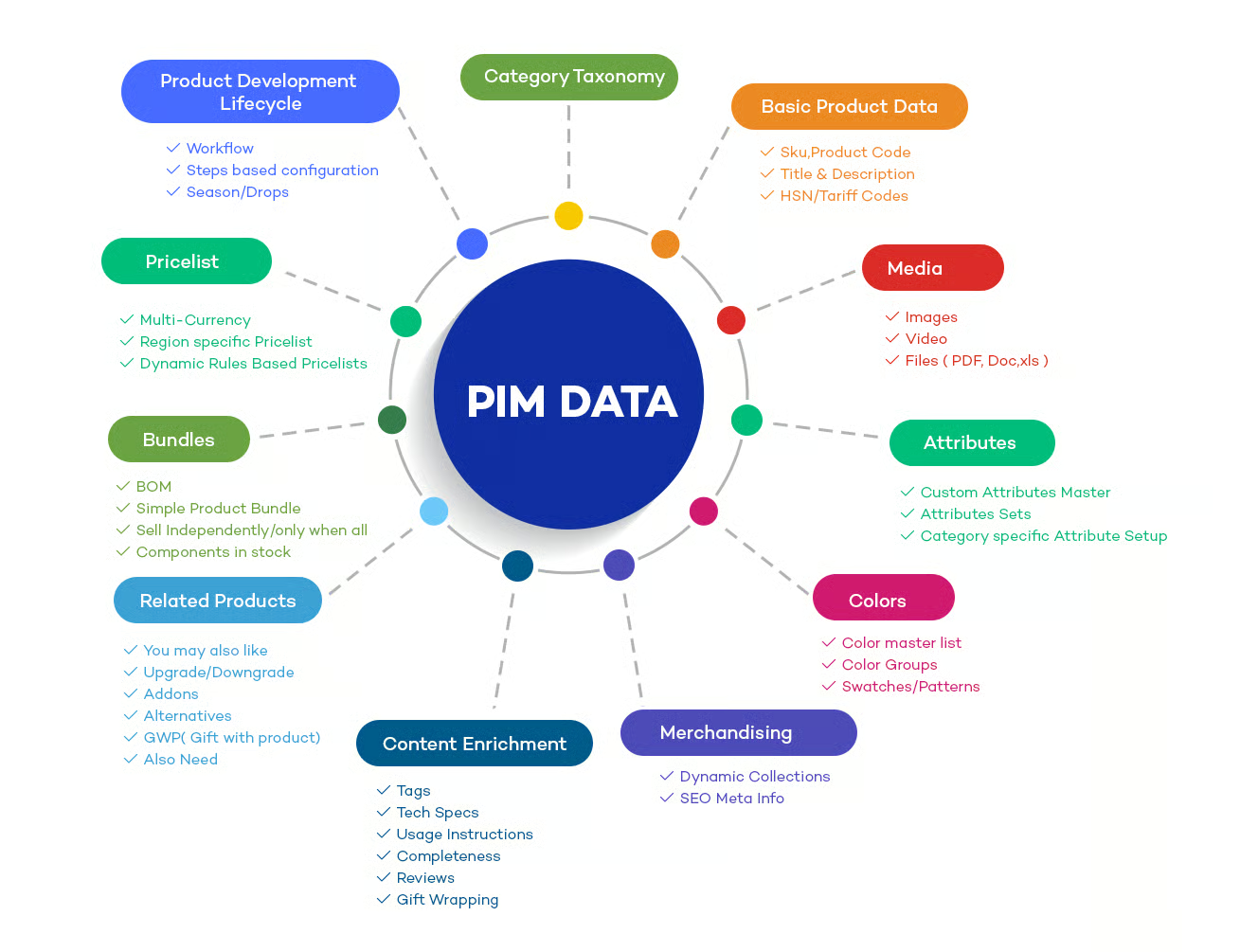
- Product names and descriptions
- Technical specifications and dimensions
- Materials, colours, and variations
- Product images and supporting documents
- Categories and attributes
- Translations and localized content
- Channel-specific product details
A PIM system provides a central place to manage this information. Instead of editing product details separately in several platforms, teams can work from an organized source and prepare the appropriate information for each destination.
For example, a furniture retailer might maintain the dimensions, materials, assembly instructions, and product images for a chair in one system. The team can then prepare a shorter marketplace listing and a more detailed website description without losing control of the underlying product information.
PIM is not the same as inventory management. Inventory systems focus on quantities, stock movements, and availability. PIM focuses on the information used to describe, market, and sell products.
The two systems may work together, but they serve different purposes.
1. Create a Reliable Central Source for Product Information
When product details live in separate spreadsheets, emails, and online stores, inconsistencies become difficult to avoid.
Different employees may save different versions of the same description. Product specifications may be copied from an older file, while images are stored in folders with unclear names.
A central product information source helps bring order to this process.
Start by identifying where your product information currently lives. This may include your eCommerce platform, supplier documents, spreadsheets, marketplace accounts, and internal product databases.
Then establish which system or process will serve as the trusted source for each type of information.
For example, your team might maintain product descriptions, materials, and dimensions in the PIM system while your inventory platform remains responsible for stock quantities.
This distinction matters. Not every product-related field should necessarily be managed in the same place.
A central source should also include clear ownership. Someone needs to know who can approve changes, resolve conflicting information, and confirm that product details are ready for publication.
The objective is straightforward: employees should not have to guess which product record is correct.
2. Standardize Product Attributes and Naming
Two products may have the same type of information recorded in completely different ways.
One supplier might describe a material as “stainless steel,” another as “SS,” and a third as “stainless.” Similarly, dimensions may appear in different units or follow inconsistent naming conventions.
These differences make catalogues harder to search, filter, compare, and maintain.
Product attributes are the individual details used to describe an item. Depending on the product category, they might include size, weight, colour, material, capacity, compatibility, or country of origin.
Establish consistent attribute definitions for each category.
For example, an electronics catalogue might require screen size, storage capacity, connectivity, and compatible accessories. A clothing catalogue might need fabric, size, fit, colour, and care instructions.
Practical standardization steps include:
- Using consistent product naming rules
- Defining required attributes for each category
- Establishing accepted units of measurement
- Maintaining approved values for fields such as colour or material
- Recording product variations in a consistent way
- Avoiding unnecessary abbreviations
Not every category needs the same attributes. A laptop and a dining table have different information requirements, so forcing them into one generic template can create unnecessary complexity.
The right structure makes it easier to compare similar products and prepare accurate listings.
3. Improve Product Descriptions Without Duplicating Work
Product descriptions often need to serve different purposes.
Your website may support a detailed product page with benefits, specifications, usage instructions, and FAQs. A marketplace may require shorter descriptions, particular fields, or a specific content structure.
Writing and maintaining each version separately can become difficult as the catalogue expands.
A PIM workflow can help teams manage approved product facts centrally while creating descriptions suited to each channel.
Start with the information customers genuinely need to make a decision. Depending on the product, this could include dimensions, compatibility, materials, included accessories, installation requirements, or care instructions.
Then distinguish between factual information and marketing copy.
For example, the dimensions of a desk should remain consistent wherever the desk is listed. The wording used to introduce the desk may differ between a website product page and a marketplace listing.
This separation helps teams adapt content without accidentally changing important specifications.
Also establish a review process. Product descriptions should be checked for accuracy, clarity, spelling, and unsupported claims before publication.
If a product’s materials or features change, update the source information and identify which channel listings need to be refreshed.
Good product content isn’t simply persuasive. It must also help customers understand exactly what they are buying.
4. Manage Product Images and Digital Assets Properly
Product information includes more than text.
Images, diagrams, instruction manuals, certificates, size charts, and other digital assets can all influence how customers understand a product.
When these files are scattered across folders or attached to individual product listings, teams may accidentally use outdated or incorrect versions.
A more structured process links approved assets to the correct product and variation.
For example, a clothing retailer may need separate images for different colours. A furniture seller might require a product image, a dimensions diagram, and an assembly guide.
Create practical rules for managing these assets:
- Use descriptive filenames and consistent identifiers.
- Associate images with the correct product and variation.
- Record relevant image details, such as angle or colour.
- Identify outdated assets that should no longer be published.
- Keep approved manuals and supporting documents linked to the right products.
- Check that images meet each sales channel’s technical requirements.
A PIM platform may include digital asset management features or integrate with a separate digital asset management system. The appropriate setup depends on how many assets you maintain and how complex your workflow is.
The goal is to make it easy for employees to find the correct asset and difficult to publish the wrong one.
5. Prepare Product Data for Different Sales Channels
Selling through several channels introduces a common problem: each destination may expect product information in a different format.
Your website may use one category structure, while a marketplace requires its own category identifiers, attribute fields, and listing rules.
Manually adapting every product can consume a significant amount of time.
A PIM workflow can help prepare channel-specific product data from a consistent central record.
Consider an online retailer selling the same appliance through its own website and two marketplaces. The product’s model number, dimensions, and core specifications should remain consistent, but the titles, descriptions, images, and required fields may need adjustments for each destination.
Useful practices include:
- Maintaining a clear mapping between internal and channel categories
- Identifying mandatory fields for each destination
- Applying channel-specific formatting rules
- Validating data before exporting or publishing
- Tracking which products are ready for each channel
- Reviewing failed exports and rejected listings
Don’t assume that a single product record can be published everywhere without changes. Different channels may have different content requirements, and those requirements can change.
Check the current documentation for each platform and test the workflow before rolling it out across the full catalogue.
6. Build a Review Process to Catch Errors Early
Product data errors can enter the business at several points.
A supplier might send incomplete specifications. An employee could select the wrong colour variation. A new product may be published before its images or dimensions have been verified.
Without clear checks, these mistakes can spread across several sales channels.
Establish quality rules based on the information that matters most.
For example, a product might not be ready for publication until it has an approved name, category, description, required specifications, and suitable images.
A useful review workflow could include:
- Data entry: Collect information from approved sources.
- Validation: Check required fields, formats, and accepted values.
- Review: Confirm important specifications and content.
- Approval: Authorize the record for publication.
- Distribution: Send the approved information to the appropriate channels.
- Monitoring: Investigate failed updates or inconsistent listings.
Automated validation can catch missing fields and formatting errors. Human review remains important for details that require judgment, such as whether a description accurately represents the product.
Pay special attention to changes that could affect customer decisions, including compatibility, dimensions, ingredients, safety information, or included components.
Fixing an error before publication is usually easier than correcting multiple live listings and responding to customer complaints afterward.
7. Measure Whether Your Product Information Process Is Improving
Introducing a new system doesn’t automatically make a catalogue better.
To understand whether your process is working, track a small set of meaningful indicators.
Depending on your business, these might include:
- Percentage of products with complete required attributes
- Number of records containing duplicate or conflicting information
- Time needed to prepare a new product listing
- Number of listings rejected because of data errors
- Time required to update information across channels
- Number of outdated product assets still in use
For example, if your team regularly spends several hours preparing a product for each marketplace, measure how long the process takes before and after introducing a standardized workflow.
If listing errors remain frequent, investigate whether the problem comes from supplier data, missing validation rules, unclear ownership, or channel-specific requirements.
Avoid tracking numbers simply because they are easy to collect. Choose measurements that reveal whether the business is saving time, improving accuracy, or helping customers make better-informed purchases.
Review the results periodically and adjust the process as the catalogue grows.
Common Product Information Management Mistakes
Even a well-planned PIM initiative can struggle when the underlying workflow is unclear.
Watch out for these common problems:
- Migrating messy data without cleaning it: A new system can reproduce old inconsistencies if they are not addressed.
- Treating every product category the same: Different products need different attributes and validation rules.
- Leaving ownership unclear: Employees may disagree about which information is authoritative.
- Publishing without validation: Missing specifications and incorrect assets can reach customers.
- Assuming every channel uses the same format: Marketplace and website requirements may differ.
- Overcomplicating the system: Too many fields and approval steps can slow routine work.
- Ignoring ongoing maintenance: Product details, supplier information, and channel requirements change over time.
A successful process is one employees can follow consistently. Start with the most important product categories and expand once the workflow is reliable.
Does Your Business Need a PIM System?
Not every business needs dedicated PIM software.
A company with a small catalogue and one sales channel may manage product information successfully through its existing eCommerce platform and a well-maintained spreadsheet.
A dedicated PIM system becomes more useful when the business has a large catalogue, several sales channels, multiple languages, frequent product updates, or many employees involved in product content.
Before investing, ask:
- How many products and variations do we manage?
- How many places publish the same product information?
- How often do errors or outdated listings occur?
- How much time does the team spend updating products?
- Which systems need to exchange product information?
- Will the expected benefits justify implementation and maintenance costs?
Also consider how product data will be imported, reviewed, exported, and maintained. A PIM system is most effective when it fits a clearly defined process.
If your business is planning a new eCommerce platform or connecting several business systems, the product information workflow should be considered alongside the broader software architecture. You can explore HiveRift US for information about web and software development solutions.
Conclusion
Product information becomes harder to manage as a business adds products, sales channels, suppliers, and employees. Without clear processes, small inconsistencies can turn into repeated work, rejected listings, and confusing customer experiences.
Product information management helps bring structure to that complexity.
Start by creating a reliable source for product details, standardizing attributes, managing digital assets, and defining how information moves to each sales channel. Add validation and review processes so that errors are caught before publication, then measure whether the workflow is improving.
You don’t need to introduce a large PIM platform immediately. You need a consistent approach to maintaining product information and a clear understanding of where your current process breaks down.
When your team can trust its product data, it becomes easier to update listings, expand into new channels, and give customers accurate information wherever they shop.
Frequently Asked Questions
1. What is product information management?
Product information management is the process of collecting, organizing, maintaining, and distributing product details across business systems and sales channels. It helps teams manage product descriptions, specifications, attributes, and digital assets consistently.
2. What is a PIM system used for?
A PIM system provides a central environment for maintaining product information and preparing it for different destinations, such as eCommerce websites, marketplaces, catalogues, and retail partner systems.
3. Is PIM the same as inventory management?
No. PIM focuses on descriptive product information, including specifications, attributes, and marketing content. Inventory management focuses on stock quantities, availability, and inventory movements. The systems may integrate with each other.
4. Which businesses benefit most from PIM software?
Businesses with large product catalogues, multiple sales channels, frequent product updates, several languages, or complex product variations are often strong candidates. Smaller businesses may be able to manage their information with existing tools.
5. Can PIM improve eCommerce operations?
Yes. A well-designed PIM workflow can reduce repetitive data entry, help keep listings consistent, simplify channel-specific formatting, and make it easier to identify incomplete product information before publication.
6. What is the difference between PIM and digital asset management?
PIM focuses on product information, while digital asset management focuses on organizing and distributing digital files such as images, videos, and documents. Some PIM platforms provide asset management features or integrate with dedicated systems.
7. How should a business start implementing PIM?
Begin by auditing existing product data, identifying authoritative sources, defining product attributes, assigning ownership, and documenting channel requirements. Clean important records before migration, then test the workflow with a manageable product category.


