



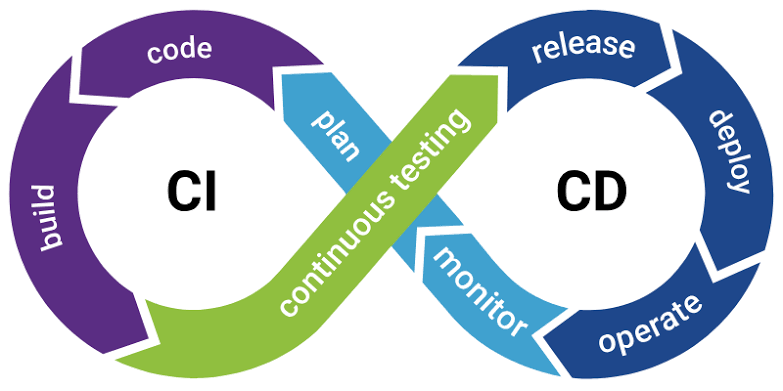
DevOps and CI/CD: Smarter Software Releases
Imagine your business needs a small change to its website or software. Perhaps you want to improve the checkout process, fix a customer-reported issue, or introduce a new feature.
The change itself may be simple. But getting it from a developer’s computer to the live application can involve testing, approvals, deployment steps, and several opportunities for something to go wrong.
This is where DevOps and CI/CD can make a real difference.
Instead of treating development, testing, and software releases as disconnected activities, these practices help teams build a more consistent process for delivering changes. The result can be fewer manual errors, quicker feedback, and a more predictable way to improve digital products.
You do not need a huge engineering department to understand the value. Even a small business developing a website, application, or internal software can benefit from a more organized release process.
What Are DevOps and CI/CD?
DevOps is a way of working that encourages software development and IT operations teams to collaborate throughout the software lifecycle.
Traditionally, developers may focus on writing new features while operations teams concentrate on deploying and maintaining the application. When these responsibilities are poorly coordinated, updates can become slow, confusing, or difficult to troubleshoot.
DevOps encourages shared responsibility, automation, communication, and continuous improvement.
CI/CD supports this approach by helping teams integrate code changes, test them, and prepare or deliver releases through repeatable workflows.
Although the terms are often used together, they describe different things. DevOps is a broader culture and set of practices, while CI/CD focuses on the processes used to integrate and deliver software changes.
Understanding Continuous Integration, Continuous Delivery, and Continuous Deployment
The terminology can sound complicated at first, but the basic ideas are straightforward.
Continuous Integration (CI)
Continuous integration means developers regularly combine their code changes in a shared repository.
Automated checks can run whenever new code is submitted. These checks may include code validation, unit tests, and other quality checks.
For example, imagine three developers working on different parts of an online store. If they wait until the end of the month to combine their work, discovering conflicts may become difficult.
With continuous integration, changes are integrated more frequently, helping teams identify problems earlier.
Continuous Delivery
Continuous delivery builds on continuous integration.
After code passes the required checks, the application can be prepared for release to a production environment. The final production release may still require a human approval.
This gives businesses more flexibility. They can prepare updates consistently while retaining control over when changes become available to customers.
Continuous Deployment
Continuous deployment takes automation a step further. Changes that pass the defined pipeline checks are automatically released to production without a separate manual release approval.
This approach can work well for teams with strong automated testing, monitoring, and rollback procedures. It is not the right choice for every business or every type of application.
The important point is that automation should match the team’s ability to manage risk—not simply maximize release speed.
Why DevOps and CI/CD Matter for Businesses
1. Software Updates Can Become More Predictable
When releases depend on a long checklist of manual tasks, the process can vary from one update to another.
One person may remember every step, while another may miss a configuration change or forget a required check.
A CI/CD pipeline creates a repeatable workflow. It can automate tasks such as building the application, running tests, and preparing deployment packages.
This consistency helps teams understand what must happen before an update is released.
2. Problems Can Be Found Earlier
A problem discovered during development is generally easier to investigate than one discovered after customers begin using the affected feature.
Automated checks can catch certain errors soon after code changes are submitted. Developers receive feedback while the change is still fresh in their minds.
This does not eliminate the need for manual testing or careful review. It helps teams identify common problems earlier and reserve human attention for more complex issues.
3. Teams Can Spend Less Time on Repetitive Work
Preparing software releases can involve repeated steps: running commands, checking dependencies, packaging files, and verifying configurations.
Automation can reduce the amount of manual work involved in these activities.
That gives developers and operations staff more time to focus on improving the product, investigating difficult problems, and helping the business meet customer needs.
4. Collaboration Can Improve
DevOps encourages teams to share responsibility for the reliability of an application rather than treating deployment as somebody else’s problem.
Developers gain a better understanding of how their changes behave in production. Operations teams can contribute knowledge about infrastructure, reliability, and deployment risks earlier in the process.
Clear ownership and communication make it easier to investigate failures and learn from them.
5. Frequent Improvements Become Easier to Manage
Businesses rarely finish a digital product once and leave it untouched.
Customer expectations change. Security updates become necessary. New features need to be introduced. Existing workflows require improvement.
A reliable release process helps teams deliver these changes in smaller, more manageable steps.
Smaller releases can make it easier to understand which change caused a problem, although good monitoring and testing remain essential.
How a CI/CD Pipeline Works
A CI/CD pipeline is a series of automated and sometimes manual steps that move code from development toward release.
A typical workflow may look like this:
Step 1: Code is written. A developer makes a change and saves it in a version-control system.
Step 2: Changes are submitted. The code is committed to a shared repository, where the team can review it.
Step 3: Automated checks run. The pipeline builds the application and runs configured tests or quality checks.
Step 4: The change is reviewed. Depending on the workflow, developers or reviewers examine the change and decide whether it meets the required standards.
Step 5: The application is prepared for deployment. The validated build is packaged and moved into a suitable test or staging environment.
Step 6: Release checks are completed. The team verifies critical behavior and confirms that the release is ready.
Step 7: The update is deployed. The release is delivered to production through the chosen deployment process.
Step 8: The application is monitored. Logs, error reports, and performance indicators help the team identify unexpected behavior after release.
The exact steps vary by project. Some workflows automate almost everything, while others include manual approvals at important decision points.
Popular Tools Used for DevOps and CI/CD
The best tool depends on your existing technology, team experience, security needs, and budget. Businesses should select tools that solve a real workflow problem rather than adopting every tool available.
Some commonly used options include:
- GitHub Actions: Automates workflows associated with repositories hosted on GitHub.
- GitLab CI/CD: Provides pipeline automation as part of the GitLab development platform.
- Jenkins: A widely used automation server that can support customized build and deployment workflows.
- Docker: Helps package applications and their dependencies into containers, supporting more consistent environments.
- Kubernetes: Helps manage containerized applications across clusters when the infrastructure and operational requirements justify it.
You can explore the official documentation for GitHub Actions and GitLab CI/CD to understand how these tools work.
You do not need to use all of them. A small project might begin with version control and a simple automated test-and-deploy workflow. More complex applications may require additional infrastructure and orchestration.
Common DevOps and CI/CD Mistakes to Avoid
Automation is useful, but implementing it without a clear plan can create new problems.
Automating a Broken Process
If the existing release process is confusing, automating it without understanding the underlying issues may simply make mistakes happen faster.
First, identify unnecessary steps, clarify responsibilities, and decide which checks are essential.
Relying on Too Few Tests
A pipeline that only checks whether code builds successfully does not prove that the application works correctly.
Include appropriate tests for critical workflows, and use additional manual, security, and performance testing where necessary.
Ignoring Secrets and Permissions
Deployment pipelines may need access to servers, cloud resources, or other sensitive systems.
Credentials should be stored securely, permissions should be limited to what is necessary, and access should be reviewed regularly. Secrets should not be embedded directly in source code.
Making Every Release Too Complicated
A small application does not necessarily need a large collection of tools and infrastructure.
Start with the simplest workflow that improves consistency and safety. Expand it when the project’s actual requirements justify doing so.
Forgetting Monitoring and Recovery
Even a well-tested release can introduce unexpected issues.
Teams should understand how to detect problems, review logs, restore service, and roll back or correct a release when necessary.
Automation is most useful when it is paired with visibility and a practical recovery plan.
How Small Businesses Can Start With DevOps
You do not have to transform your entire development process in one day.
Begin by identifying the part of software delivery that causes the most frustration. Perhaps deployments take too long, manual steps are frequently missed, or developers struggle to determine whether a change has broken an existing feature.
Then take a gradual approach:
- Use version control consistently. Keep track of changes and make collaboration easier.
- Automate one important check. Start with a build step or a small set of repeatable tests.
- Create a staging environment. Where practical, test releases in an environment that resembles production.
- Document the release process. Make responsibilities, approvals, and recovery steps clear.
- Add automation gradually. Introduce additional checks when they solve an identified problem.
- Review the results. Measure whether releases are becoming more reliable and whether recovery from failures is improving.
Teams can also learn from the Google Cloud DevOps Research and Assessment (DORA) resources, which explore software delivery performance and practices that support reliable teams.
Focus on useful outcomes, not the number of tools in your technology stack.
How HiveRift US Fits Into Your Digital Growth Plans
As businesses develop websites, applications, and other digital solutions, the way those products are maintained and improved becomes increasingly important.
A dependable development process can help teams manage changes more carefully, address issues systematically, and plan future improvements with greater confidence.
If your business is considering a new digital project or reviewing its current development needs, visit HiveRift US to explore its digital development offerings and discuss your requirements.
When planning a project, ask how code changes will be tested, how releases will be managed, how sensitive credentials will be protected, and what happens if a deployment causes an issue.
These practical questions help you evaluate the development process—not just the features promised for launch.
Conclusion
DevOps and CI/CD help businesses create a more consistent way to build, test, release, and maintain software.
By improving collaboration and automating repeatable tasks, teams can identify certain problems earlier, reduce manual deployment work, and deliver improvements in manageable steps.
The key is to begin with the challenges your business actually faces. Choose appropriate tools, introduce meaningful tests, protect deployment credentials, and establish a reliable way to monitor and recover from problems.
Software delivery does not become better simply because more tasks are automated. It becomes better when automation, teamwork, testing, and clear responsibilities work together.
Frequently Asked Questions
1. What is DevOps in simple terms?
DevOps is an approach that brings development and IT operations closer together so teams can build, release, and maintain software more collaboratively and reliably.
2. What does CI/CD stand for?
CI/CD commonly refers to continuous integration and continuous delivery or continuous deployment. These practices help automate code integration, testing, and software release workflows.
3. Is DevOps suitable for small businesses?
Yes. Small businesses can benefit from basic version control, automated tests, consistent deployment procedures, and monitoring. They can add more advanced tools as their needs grow.
4. Does CI/CD eliminate software bugs?
No. CI/CD can help detect certain problems earlier, but automated checks cannot identify every possible defect. Manual testing, code review, monitoring, and maintenance remain important.
5. What is the difference between continuous delivery and continuous deployment?
Continuous delivery keeps validated changes ready for release, often with a human approval before production. Continuous deployment automatically releases qualifying changes to production after they pass the configured checks.
6. Which CI/CD tool should a business choose?
Choose a tool that fits your repository, technology stack, team skills, security requirements, and deployment environment. GitHub Actions, GitLab CI/CD, and Jenkins are common options.
7. How does DevOps improve software quality?
DevOps can improve quality through shared responsibility, repeatable processes, automated checks, faster feedback, and better monitoring. Results depend on how well these practices are implemented.


