



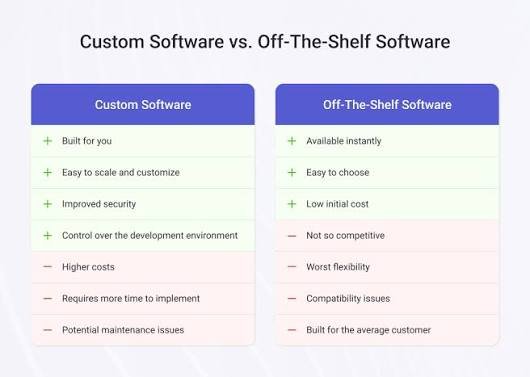
Custom Software vs Off-the-Shelf Software: 7 Key Differences
Running a business is already complicated enough. You have customers to serve, employees to manage, deadlines to meet, and a dozen small tasks competing for your attention.
Technology should make that work easier.
But choosing the right software is not always straightforward. You might find a ready-made tool that handles most of your needs, yet the remaining tasks still require spreadsheets and manual work. Alternatively, you might consider building custom software, only to wonder whether the additional investment is worth it.
This is the real question behind custom software vs off-the-shelf software: should you adapt your business to an existing product, or invest in a solution designed around your business?
There is no single answer that works for everyone. The right choice depends on your processes, budget, timeline, and plans for growth.
Let’s look at the differences in practical terms so you can make a decision that works for your business, not just your technology budget.
What Is Custom Software vs Off-the-Shelf Software?
Before comparing the two, it helps to understand what each option means.
Custom software is developed to meet specific business requirements. It can be designed around your workflows, users, reporting needs, and integrations. Examples include a tailored inventory management system, a specialised customer portal, or an internal application that connects several business processes.
Off-the-shelf software is an existing product developed for a broader market. Many businesses can subscribe to or purchase it and begin using its available features. Examples include accounting platforms, project management tools, email services, and customer relationship management systems.
The distinction is not simply between expensive and affordable software. A ready-made product can be highly sophisticated, while custom software can be simple or complex depending on the requirements.
The important question is how well each option solves the problem you are trying to fix.
1. Cost: What Will You Pay Now and Later?
Cost is often the first thing business owners consider, and understandably so.
Ready-made software generally has a lower starting cost. Depending on the product, you might pay a monthly subscription, an annual licence, or a one-time fee. You can often begin using it without funding an entire development project.
Custom software usually requires a larger initial investment because someone must plan, design, develop, and test the solution. The final cost depends on its features, integrations, security requirements, and complexity.
However, the initial price does not tell the whole story.
When comparing costs, include:
- Subscription or licence fees.
- Setup and configuration expenses.
- Integration with your existing systems.
- Staff training and onboarding.
- Maintenance and technical support.
- Future upgrades and additional features.
- Data migration and possible switching costs.
Imagine a business paying for several subscriptions while employees still transfer information between them manually. The software may appear affordable, but the time spent managing disconnected tools also has a cost.
On the other hand, custom software can become expensive if requirements keep changing or the business needs a dedicated team for ongoing maintenance.
The practical approach: estimate the total cost over several years, not just the amount required to get started.
2. Flexibility: Can the Software Match Your Workflow?
Every business has its own way of working.
A retail company may need detailed stock tracking. A service business may prioritise appointments, employee schedules, and customer communication. A distributor may require a specific approval process before an order can be dispatched.
Off-the-shelf software provides features designed for common requirements. That is useful because you do not have to build everything yourself. However, you may need to adjust your workflow to match how the product operates.
Sometimes that is perfectly reasonable. Businesses often discover that a standard process is more efficient than their existing way of doing things.
Problems arise when the software cannot accommodate a process that genuinely matters to the business.
Custom software offers more control over how features work and how users interact with the system. It can be designed around specific rules, approvals, reports, and workflows.
That flexibility also comes with responsibility. Your business must define what it needs, prioritise features, and manage changes carefully.
Choose custom development when the workflow difference creates a meaningful business advantage or a significant operational problem. Do not build a custom tool simply because a ready-made product looks slightly different from what you imagined.
3. Implementation Time: How Quickly Do You Need a Solution?
Sometimes, a business needs to solve a problem immediately.
Perhaps invoices are being delayed, customer enquiries are getting lost, or employees are spending too much time coordinating tasks manually.
In such situations, implementation time matters.
Off-the-shelf software can often be introduced more quickly, particularly when its existing features match your requirements. You may only need to configure settings, import data, train employees, and connect a few systems.
Custom software requires a development process. The team needs to understand the requirements, plan the solution, build the features, test them, and prepare the application for use.
The timeline depends on the project’s scope, so avoid assuming every custom project takes the same amount of time.
There is also a middle ground: launch a smaller first version with the most important features, then introduce additional functionality as your needs become clearer.
Before choosing either option, ask how quickly you need a useful result and what the business will lose if the problem remains unsolved.
A solution that takes longer to build may still be worthwhile if it removes a major long-term limitation. But when a standard product solves the problem adequately today, there may be little reason to delay.
4. Integrations: Will It Work With Your Existing Tools?
Your business probably uses more than one digital tool.
You might have accounting software, an online store, a payment gateway, a customer database, and a system for managing orders. If these tools cannot share information effectively, employees may need to enter the same details repeatedly.
That creates extra work and increases the chance of mistakes.
Off-the-shelf products sometimes provide built-in integrations, plugins, or APIs that allow them to connect with other systems. Before buying a product, check whether the integrations you need are available, supported, and included in the expected price.
Custom software can be designed to connect with your existing tools, provided those systems offer suitable access and the integration is technically feasible.
However, custom development does not automatically guarantee that every connection will be simple. Third-party API limits, licensing restrictions, data formats, and future changes can all affect the work.
For example, an order management application might need to send order details to an accounting platform and receive updated payment information. The integration must handle errors, duplicate requests, and changes in the external system.
Ask how data will move between applications, which system will act as the main source of truth, and how integration failures will be detected.
The best solution is one that reduces unnecessary manual work without introducing fragile connections.
5. Maintenance and Support: Who Keeps It Working?
Software needs attention after implementation, regardless of how it was acquired.
Ready-made products are generally maintained by their vendors. Depending on the agreement, updates, security patches, bug fixes, and new features may be included in the subscription or licence.
This can reduce the amount of technical work your business needs to manage directly.
However, you also depend on the vendor’s decisions. A feature may change, a pricing plan may be revised, or a product may eventually be discontinued. Your business may have limited control over the timing of these changes.
Custom software gives you more control over the development roadmap, but someone must take responsibility for maintenance.
That may involve updating dependencies, resolving bugs, monitoring performance, maintaining integrations, reviewing security, and adapting the application as your business changes.
Before commissioning custom software, clarify who will maintain it, how support will be provided, and what happens if your original developer becomes unavailable.
Also make sure your business has appropriate access to the source code, documentation, hosting accounts, and data, subject to the agreed ownership and licensing terms.
A system is only a good long-term investment if you can keep it reliable and useful.
6. Scalability: Can the Solution Grow With Your Business?
Your business may have very different requirements today than it will have in three years.
You might begin with a small team and a limited customer base, then expand into new markets, hire more employees, or introduce new services.
The software you choose should be able to support a reasonable level of that growth.
Off-the-shelf products can be an excellent choice when they offer suitable plans, user limits, storage, integrations, and features for your expected needs. Moving to a higher plan may be easier than commissioning a new application.
However, growth can become difficult if the vendor does not support a critical workflow or if the product imposes restrictions that conflict with your plans.
Custom software can be extended to support new business requirements, but only if it is designed and maintained appropriately. Poor architecture can make custom applications difficult and expensive to expand.
When evaluating either option, ask:
- Can it support more users and larger amounts of data?
- Can new features be introduced without disrupting existing operations?
- Will it integrate with the systems we may adopt later?
- What happens if our usage increases significantly?
- Are there limits or costs that could become problematic?
You do not need to predict every future possibility. You simply need to understand the likely direction of your business and avoid a solution that creates an obvious obstacle.
7. Ownership and Control: How Much Freedom Do You Need?
Ownership is an important difference that deserves attention before you sign an agreement.
With off-the-shelf software, you generally receive permission to use the product under the vendor’s licence or subscription terms. You usually do not own its underlying source code or control its development roadmap.
That arrangement is often beneficial. The vendor handles much of the technical work, allowing your team to focus on operations.
The trade-off is dependence on the provider’s features, policies, pricing, and availability.
With custom software, ownership depends on the contract and the components used. Your agreement should clearly state which code, designs, documentation, and other deliverables belong to your business, as well as any third-party licensing restrictions.
Custom development may provide greater control over feature priorities, workflows, and future changes. But that control comes with responsibility for maintenance, technical decisions, and continued investment.
Ask yourself how much control your business genuinely needs.
If your software requirements are standard, vendor-managed tools may be entirely sufficient. If a particular system is central to your operations or competitive advantage, greater control may justify custom development.
Custom Software vs Off-the-Shelf Software: Quick Comparison
| Factor | Custom Software | Off-the-Shelf Software |
|---|---|---|
| Initial investment | Usually higher | Often lower |
| Time to get started | Requires development | Often faster to implement |
| Workflow flexibility | Can be tailored to requirements | Depends on available features |
| Maintenance | Arranged by your business or development partner | Generally handled by the vendor |
| Integrations | Can be designed for specific systems | Depends on supported integrations |
| Feature control | Greater control over development priorities | Depends on the vendor’s roadmap |
| Long-term responsibility | Your business must plan for ongoing support | Shared according to the vendor’s service terms |
These are general patterns, not universal rules. Some ready-made products offer extensive customisation, and some custom applications are relatively simple to maintain.
Compare actual products and project proposals before making a final decision.
When Should You Choose Off-the-Shelf Software?
A ready-made product is often the sensible choice when:
- Your requirements are common and well understood.
- You need to start using the software quickly.
- Your budget is limited.
- Existing products already offer the features you need.
- You prefer the vendor to handle most routine maintenance.
- You do not need extensive control over the product’s roadmap.
For example, a small business that needs standard invoicing, expense tracking, and financial reports may be better served by an established accounting platform than by commissioning a new application.
There is no benefit in rebuilding functionality that already works well for your business.
When Does Custom Software Make More Sense?
Custom development may be worth considering when:
- Existing products cannot support important business processes.
- Your team relies heavily on manual workarounds.
- Several systems need to work together in a specific way.
- You need specialised permissions, reporting, or approval workflows.
- Your requirements are central to how your business competes.
- You need greater control over the software’s future development.
For example, a distribution company with complex stock rules, multiple approval stages, and specialised reporting may find that standard tools cannot support its operations without extensive workarounds.
Custom software could help bring those processes together, provided the expected benefits justify the development and maintenance costs.
Is There a Middle Ground?
Absolutely. You do not always have to choose between buying everything and building everything.
Many businesses use a combination of existing software and targeted custom development.
You might use a ready-made accounting platform, an established customer relationship management system, and a custom application that connects them to an internal workflow.
Another option is to begin with an existing product and add integrations or carefully selected extensions. If the business later outgrows that setup, you can evaluate a more tailored solution.
This approach can reduce the initial investment while helping you address the most important operational problems.
The key is to understand where standard software is sufficient and where a genuine gap remains.
Conclusion: Choose the Software That Solves Your Real Problem
The debate around custom software vs off-the-shelf software is not about deciding which option is always better. It is about finding the right balance between flexibility, cost, speed, and control.
Ready-made software can help you get started quickly without taking on the responsibility of building and maintaining an entire application. Custom software can provide a better fit when your business has specialised requirements that existing products cannot handle effectively.
Start by identifying the problem you want to solve. Compare available products, calculate the total cost of ownership, consider future requirements, and involve the people who will use the system every day.
If you are exploring a tailored technology solution, visit HiveRift US to learn more about business technology options and identify an approach that fits your requirements.
The best software is not necessarily the one with the most features. It is the one that helps your business work better without creating unnecessary complexity.
Frequently Asked Questions
1. Is custom software more expensive than off-the-shelf software?
Custom software usually requires a larger initial investment because it must be planned, developed, and tested. However, the total long-term cost depends on maintenance, subscriptions, integrations, staff time, and how well the solution fits your needs.
2. Is off-the-shelf software suitable for small businesses?
Yes. Ready-made software is often a practical choice for small businesses because it can be quicker to implement and less expensive initially. It works particularly well when the available features match everyday business requirements.
3. Can off-the-shelf software be customised?
Many products support configuration, extensions, plugins, or integrations. The available options depend on the vendor and product plan. Check whether the changes you need are supported before committing.
4. How long does custom software development take?
The timeline depends on the application’s complexity, integrations, requirements, testing, and team availability. A small, clearly defined application may take much less time than a complex business platform.
5. Can a business use both custom and ready-made software?
Yes. A hybrid approach can combine established products with targeted custom applications or integrations. This can help businesses avoid rebuilding standard features while addressing specific operational needs.
6. How should I decide which option is right for my business?
List your essential requirements, compare suitable existing products, estimate the total cost, and identify any important gaps. Choose custom development only when its benefits justify the additional investment and ongoing responsibility.


