



CRM Software for Small Businesses: A Practical Guide
A potential customer fills out your website’s contact form. Someone on your team receives an email, promises to follow up, and then gets pulled into another task.
Two days pass.
The customer contacts a competitor instead.
Nobody deliberately ignored the enquiry. The problem was that the business had no reliable system for tracking it.
This situation is more common than many business owners realize. Customer details live in spreadsheets, conversations are scattered across email accounts, follow-up reminders exist in people’s heads, and nobody has a complete picture of what is happening with the sales pipeline.
That is where CRM software for small businesses can make a meaningful difference.
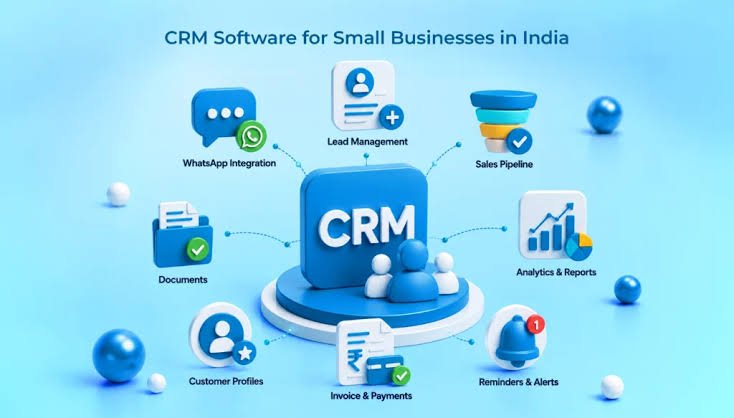
A customer relationship management system, commonly called a CRM, helps businesses organize customer information, track sales opportunities, record interactions, and manage follow-up activities in one place.
It is not just a tool for large companies with dedicated sales departments. Even a small team can benefit from having a clearer view of its customers and the conversations that matter.
But buying CRM software does not automatically solve a sales problem. The real value comes from choosing a system that fits your business and using it to improve the way your team works.
Let’s look at how that works in practice.
What Is CRM Software?
CRM stands for Customer Relationship Management.
CRM software is a digital system that helps businesses manage information and interactions associated with customers, prospects, and sales opportunities.
Depending on the platform, it may allow you to:
- Store customer contact details.
- Record calls, meetings, emails, and other interactions.
- Track leads from the first enquiry to a completed sale.
- Assign follow-up tasks to team members.
- Manage sales pipelines and opportunity stages.
- Automate selected reminders and repetitive workflows.
- Generate reports about sales activities and business performance.
Imagine a small web development agency receiving enquiries through its website, referrals, and social media.
Without a CRM, the team might record each enquiry in a different place. One salesperson may know that a prospect requested a proposal, while another may have no idea that a conversation has already taken place.
With a well-organized CRM, the team can maintain a shared record of the lead, the services discussed, the next action, and the status of the opportunity.
The system becomes a practical reference point instead of forcing people to remember everything themselves.
Why Small Businesses Need a Better Way to Manage Customers
When a business is new, managing customers manually may seem perfectly reasonable.
There are only a few leads, everyone knows what is happening, and the owner can remember most conversations.
Then the business grows.
More enquiries arrive. Different employees handle different customers. Follow-ups become more frequent, and the sales process becomes harder to track.
This is often when manual systems begin to show their limitations.
1. Stop Losing Track of Potential Customers
Every enquiry represents a possible business opportunity, although not every enquiry will become a sale.
The challenge is making sure each relevant lead receives appropriate attention.
A CRM can help you record when someone contacted your business, what they need, whether a proposal has been sent, and what should happen next.
For example, if a customer asks for a website redesign quotation, you can create a lead record, assign it to a team member, and schedule a follow-up after the proposal is delivered.
This makes the next action visible instead of leaving it buried in an inbox.
The benefit is not that every lead will convert. It is that fewer opportunities have to depend on memory alone.
2. Keep Customer Information Organized
Customer information becomes difficult to manage when it is spread across several systems.
You might have one phone number in a spreadsheet, a project discussion in email, a proposal in a shared folder, and a meeting summary in someone’s notes.
A CRM can bring relevant information together so authorized team members can understand the relationship without searching through multiple disconnected records.
This can be especially useful when a customer speaks to more than one person at your company.
However, a CRM should not become a dumping ground for unnecessary personal information. Collect only what your business needs, apply appropriate access controls, and follow the privacy requirements relevant to your customers and location.
3. Make Follow-Ups More Consistent
Following up with a prospect is often less about persuasion and more about maintaining a clear conversation.
A customer may need time to review a proposal, obtain approval, or compare options. If your team forgets to check back, a promising opportunity can quietly disappear.
CRM software can help schedule reminders and make outstanding tasks visible.
A salesperson might see that a proposal needs a follow-up today or that a prospect requested a call next week.
This makes follow-up activity more systematic without requiring every interaction to become an automated sales message.
The best approach is to use reminders to support thoughtful communication, not to bombard customers with repeated messages.
4. Understand Your Sales Pipeline
A sales pipeline shows where potential customers are in your sales process.
Your stages might include:
- New enquiry
- Initial conversation
- Qualified opportunity
- Proposal sent
- Negotiation or review
- Won or lost
The exact stages should reflect how your business actually sells.
A CRM can show how many opportunities sit at each stage, which proposals are awaiting a response, and where deals are becoming stuck.
For example, if many opportunities reach the proposal stage but few progress further, you may need to investigate your pricing, proposal quality, qualification process, or follow-up approach.
The pipeline will not tell you the complete story on its own, but it can help you identify where further investigation is worthwhile.
What Features Should You Look for in CRM Software?
Not every small business needs a large platform with dozens of modules.
In fact, too many features can make a CRM harder to use and more expensive to maintain.
Start with the capabilities that address your current problems.
Contact and Lead Management
Your CRM should make it easy to create, update, search, and organize customer records.
It should also help distinguish between new leads, existing customers, and opportunities that require further attention.
Look for a system that keeps records understandable and reduces unnecessary duplication.
Task and Follow-Up Management
Tasks and reminders are especially useful for small teams that cannot afford to let important conversations disappear.
You should be able to assign responsibilities, set due dates, and identify overdue activities.
A good process makes it clear who is responsible for the next step.
Sales Pipeline Management
If your business sells through proposals, consultations, or negotiations, pipeline management can provide a useful overview.
Make sure the stages are easy to customize and reflect your actual process.
Avoid creating so many stages that updating the CRM becomes more work than managing the sale itself.
Email and Calendar Integration
Integration with existing communication tools can reduce repetitive data entry and make customer interactions easier to review.
Before choosing a CRM, confirm which email providers, calendars, and communication systems it supports.
Check whether the integration is included in your subscription or requires an additional plan.
Reporting and Analytics
Reports can help you understand lead sources, opportunity progress, sales activity, and conversion patterns.
Start with a few questions that matter to your business. For example:
- How many qualified leads did we receive this month?
- How many proposals are awaiting a response?
- Which sources generate the most useful enquiries?
- How long does it typically take to move an opportunity through the pipeline?
The best reports help you make decisions. More charts do not necessarily mean better insight.
Automation
Some CRM systems can automate repetitive tasks, such as assigning incoming leads, creating follow-up reminders, or notifying a team member when an opportunity changes stage.
Automation can save time when the underlying process is clear.
However, automating a confusing process can simply help you repeat the same mistakes faster.
Start by simplifying the workflow. Automate only the steps that are predictable, useful, and safe to handle without unnecessary manual intervention.
How to Choose CRM Software for Your Small Business
Choosing a CRM should begin with your business process, not a comparison of feature lists.
Step 1: Identify Your Main Problem
Ask what is currently going wrong.
Are you losing track of enquiries? Forgetting follow-ups? Struggling to see the sales pipeline? Spending too much time finding customer information?
Write down the two or three problems that matter most.
This creates a practical basis for evaluating potential systems.
Step 2: Define Your Essential Features
Separate essential requirements from optional features.
A small consulting business may need contact records, tasks, and a simple sales pipeline. An online business with a large support team may need additional integrations, permissions, reporting, and service workflows.
Avoid paying for complex functionality unless you have a clear reason to use it.
Step 3: Check the Total Cost
CRM pricing can depend on the number of users, subscription tier, automation limits, storage, integrations, and additional modules.
Consider the total cost over a year rather than looking only at the advertised entry-level price.
Also consider implementation, staff training, data migration, and ongoing administration.
A platform that seems inexpensive may require paid upgrades for the functions you need. A more expensive platform may offer better value if it reduces substantial manual work.
The right decision depends on your actual requirements and budget.
Step 4: Evaluate Ease of Use
A CRM is useful only if your team keeps it updated.
During a trial or demonstration, try creating a lead, recording a conversation, assigning a task, and moving an opportunity through the pipeline.
Notice how many steps are involved.
If routine tasks feel unnecessarily complicated, your team may avoid using the system consistently.
A simpler platform that everyone understands can be more effective than a sophisticated system that only one employee knows how to operate.
Step 5: Check Integrations and Data Export
Make sure the CRM works with the tools your business already relies on.
If you use a website contact form, email platform, calendar, accounting system, or project management tool, check what integration options are available.
Also understand how you can export your customer records and what happens if you decide to switch providers later.
Data access and portability are important considerations before you commit to a long-term platform.
Popular CRM Options Worth Comparing
Several established platforms offer CRM capabilities for businesses of different sizes. Their suitability depends on your budget, required features, integrations, and preferred workflow.
HubSpot CRM: hubspot.com/products/crm offers contact management and sales-related tools, with additional capabilities available across its product plans.
Zoho CRM: zoho.com/crm provides sales and customer relationship management features, including options for organizing leads and managing sales processes.
Salesforce: salesforce.com/crm offers CRM capabilities for businesses with a range of sales and customer management requirements.
These are examples to investigate, not a universal ranking. Product features, subscription terms, and pricing can change, so compare current plans directly before making a decision.
A small business should not choose a CRM simply because it is popular. It should choose the system that its team can use consistently and that addresses its actual workflow.
How to Implement a CRM Without Overwhelming Your Team
Buying the software is only the beginning.
A CRM implementation can become frustrating when the business tries to transfer every historical record, create dozens of custom fields, and automate the entire sales process before anyone has learned the basics.
A more manageable approach is to begin with one clear workflow.
Start With a Simple Sales Process
Define what happens when a new enquiry arrives.
Who reviews it? How is it qualified? When should the first response happen? What information needs to be recorded? Who owns the next action?
Document the process before configuring the system.
The CRM should reflect the workflow your team needs rather than forcing everyone to follow an unnecessarily complicated setup.
Clean Your Data Before Importing It
If customer records are scattered across spreadsheets or other tools, review them before importing.
Remove unnecessary duplicates, correct obvious errors, and decide which fields are genuinely useful.
Poor-quality information can undermine confidence in the system from the beginning.
For larger migrations, plan the process carefully and retain an appropriate backup of the original records.
Train the Team Around Real Tasks
Do not train employees by showing them every menu and feature.
Instead, demonstrate the tasks they will perform regularly: adding a lead, recording a conversation, scheduling a follow-up, and updating an opportunity.
Explain why these actions matter and how they help colleagues work together.
Short, practical training sessions are often easier to apply than a long presentation covering every possible feature.
Review the Process After a Few Weeks
Once the team starts using the CRM, ask what is working and what feels unnecessarily difficult.
Perhaps there are too many required fields. Maybe the pipeline stages are unclear, or a useful reminder is missing.
Make small adjustments based on actual experience.
The goal is to create a system that supports the work rather than adding administrative burden.
CRM Automation: Where It Helps and Where It Doesn’t
Automation can be one of the most useful parts of a CRM, but it deserves a thoughtful approach.
Consider a business that receives website enquiries throughout the day.
A workflow could automatically create a lead record, assign the enquiry to the right team member, and create a task for follow-up.
This can reduce manual data entry and make responsibility clearer.
Other useful automations might include reminders for overdue proposals or notifications when an important customer interaction takes place.
However, automation should not replace judgment where a situation requires human attention.
An automated message sent at the wrong time or a workflow that repeatedly contacts someone who has already responded can damage the customer experience.
Before activating an automation, test it with realistic scenarios. Confirm what triggers it, who receives the information, and how errors or exceptions are handled.
Also consider the privacy implications of storing customer data and connecting multiple systems.
Automation works best when it removes repetitive work while leaving people in control of important decisions and relationships.
How to Measure Whether Your CRM Is Working
A CRM should create practical improvements, not simply produce a database full of customer records.
Before implementation, identify what you want to improve.
For example, you may want to reduce missed follow-ups, respond to enquiries more consistently, improve visibility into sales opportunities, or reduce the time employees spend searching for information.
Then monitor a small set of relevant measures.
Useful indicators might include:
- The proportion of active leads with a clearly assigned next action.
- The number of overdue follow-up tasks.
- Time taken to respond to incoming enquiries.
- Progression of qualified opportunities through the pipeline.
- Sales conversion rates, interpreted alongside lead quality.
- Time spent on manual data entry and reporting.
- Consistency of CRM use across the team.
Avoid assuming that a change in sales results must have been caused by the CRM alone. Pricing, market conditions, product quality, and lead sources can also influence performance.
The most useful question is whether the system is helping your business work more consistently and make better-informed decisions.
Common CRM Mistakes Small Businesses Should Avoid
Several avoidable mistakes can reduce the value of an otherwise capable CRM.
Choosing software before defining the process. You may end up configuring features that do not solve your real problems.
Making the system too complicated. Too many fields, stages, and rules can discourage employees from keeping records updated.
Ignoring data quality. Duplicate contacts and outdated information make reports less reliable.
Failing to assign responsibility. A shared lead record does not help much if nobody knows who should follow up.
Automating everything immediately. Poorly designed workflows can spread errors across the system.
Neglecting training. Employees need to understand both how the system works and why the business uses it.
Ignoring privacy and security. Customer records should be handled with appropriate permissions, retention practices, and safeguards.
Measuring activity instead of outcomes. The number of records created is less important than whether the CRM helps your team manage relationships and opportunities effectively.
Avoiding these mistakes is often more valuable than choosing a platform with the largest feature list.
Frequently Asked Questions About CRM Software
What is the main purpose of CRM software?
The main purpose of CRM software is to help businesses organize customer information, record interactions, manage leads, and coordinate follow-up activities. Depending on the platform, it may also support sales automation, reporting, and customer service workflows.
Is CRM software useful for a very small business?
Yes. A small business can benefit from a simple CRM when it receives enough enquiries or manages enough customer relationships that manual tracking becomes difficult. The best starting point may be a lightweight system rather than a complex enterprise platform.
Is CRM software expensive?
Costs vary by platform, plan, user count, integrations, and features. Some providers offer free or entry-level options, while advanced systems can require a larger budget. Check the current pricing and limitations before choosing.
Can CRM software integrate with a business website?
Many CRM platforms can connect with website contact forms, landing pages, and other tools through built-in integrations, plugins, or APIs. The exact options depend on the website technology and CRM you select.
Does a CRM automatically increase sales?
No. A CRM can improve organization, visibility, and follow-up consistency, but sales still depend on factors such as lead quality, the offer, pricing, customer needs, and the sales process. The software supports the work; it does not replace it.
How long does CRM implementation take?
The timeline depends on the amount of data, number of users, required integrations, workflow complexity, and training needs. A basic setup may be relatively quick, while a system with extensive customization and migration requirements can take considerably longer.
What is the difference between CRM and project management software?
CRM software focuses on customer relationships, leads, and sales opportunities. Project management software focuses on planning and delivering tasks or projects. Some businesses use both, with integrations connecting the customer relationship to the work being delivered.
Final Thoughts: Build Better Customer Relationships, Not Just a Bigger Database
Small businesses do not need complicated software simply to appear professional. They need systems that solve real problems.
If your team regularly loses track of enquiries, forgets follow-ups, or struggles to understand the status of customer conversations, CRM software may be worth exploring.
Start by identifying the gaps in your current process. Choose a system that matches your requirements, keep the initial setup simple, and make sure everyone understands how to use it.
Then measure whether the system is making customer management more consistent and helping your team spend less time searching for information.
A CRM is most valuable when it becomes part of a practical, customer-focused workflow rather than another tool employees are expected to update without a clear purpose.
If you are exploring ways to improve your business’s digital operations, visit HiveRift to learn more about its online presence and available digital solutions.
Better customer relationships begin with better organization, consistent communication, and a clear understanding of what happens next.


