



Cloud-Native Development: 7 Smart Benefits for Businesses
A business application can work perfectly when it has a few hundred users and still struggle when thousands of people start using it at the same time. New features may take too long to release, infrastructure costs can become difficult to predict, and even a small technical change might put the entire application at risk.
These problems often appear when a business grows faster than its software architecture.
Cloud-native development offers a different way to build and operate applications. Instead of simply moving existing software to a cloud server, it involves designing applications to take advantage of cloud infrastructure, automated deployment, scalable services, and modern operational practices.
For growing businesses, the goal is not to adopt every new technology. It is to create software that can respond to changing demands without making every update more complicated than the last.
What Is Cloud-Native Development?
Cloud-native development is an approach to building and running applications that are designed to operate effectively in cloud environments.
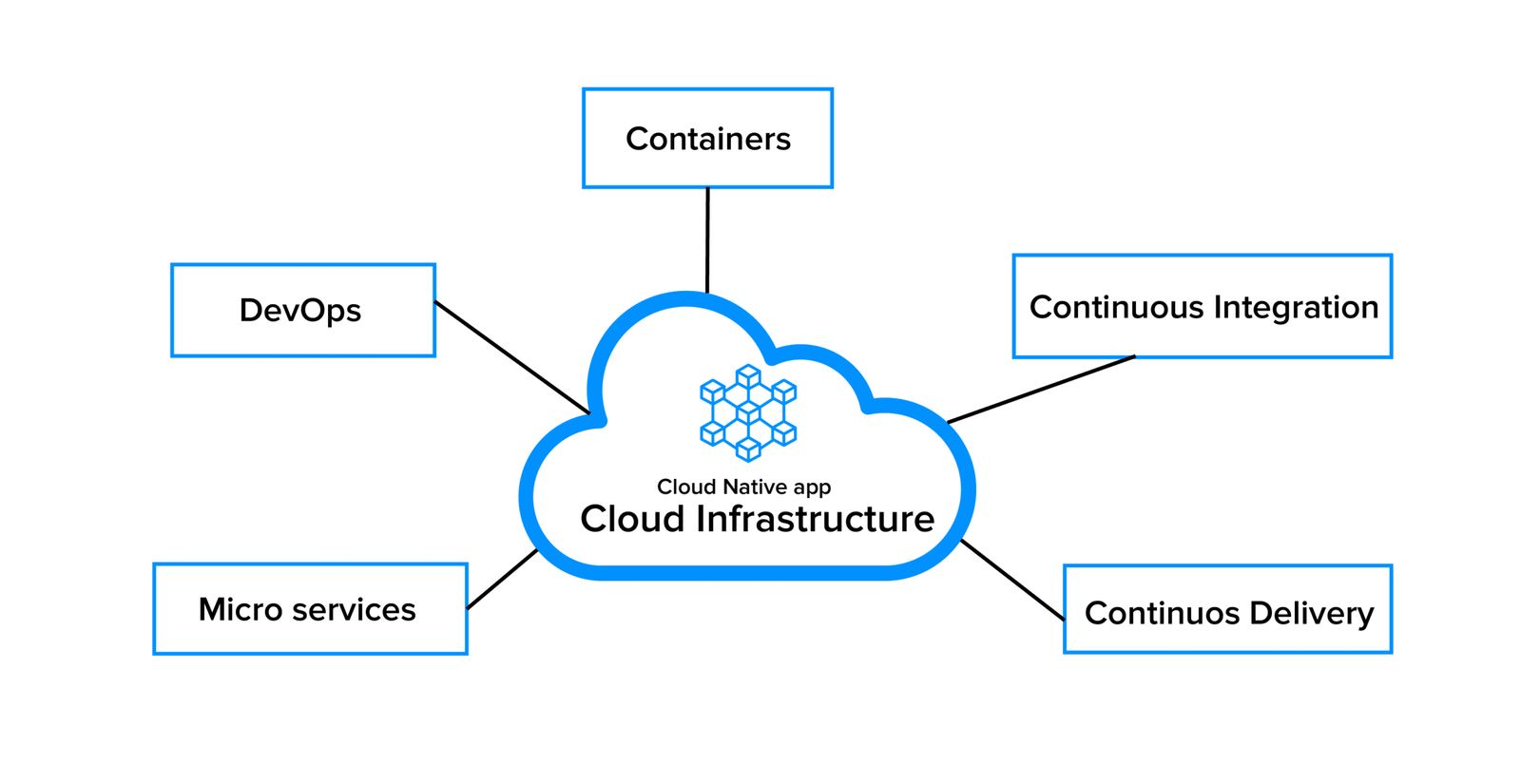
Depending on the project’s requirements, a cloud-native application may use containers, managed cloud services, microservices, automated testing, continuous delivery, monitoring, and infrastructure defined through code.
Not every cloud-native application needs all these components. A well-designed application with a modular architecture and managed cloud services may be a better fit for a small business than a complicated network of dozens of microservices.
The important distinction is this: cloud-native development focuses on how software is designed, deployed, scaled, and maintained—not simply where it is hosted.
If your business is planning a new platform or modernizing an existing product, understanding this difference can help you make better technology decisions.
1. Scale Applications When Demand Changes
Traffic rarely stays consistent throughout the day or year.
An online store may receive a surge of visitors during a major sale. A booking platform might experience heavy demand during holidays. A business application could see a sudden increase in usage after a successful marketing campaign.
Cloud-native architectures can make it easier to adjust computing resources as demand changes.
For example, an application running in containers may use orchestration and autoscaling to add application instances when workloads increase and reduce them when demand falls. Managed cloud services can also reduce the amount of infrastructure a team needs to operate manually.
However, scaling is not automatic simply because an application runs in the cloud. Database connections, third-party APIs, background jobs, and poorly designed code can still become bottlenecks.
Before introducing autoscaling, identify which parts of your application are under pressure and establish sensible limits.
The real benefit is flexibility: your infrastructure can respond to changing demand instead of forcing your business to maintain the same capacity at all times.
2. Release New Features More Frequently
Customers do not always wait patiently for software improvements. They expect useful features, quick fixes, and a smoother experience as their needs change.
Traditional release processes can become slow when development, testing, and deployment depend on manual steps. A small update may require several teams to coordinate, increasing the time between writing code and delivering value.
Cloud-native development often works alongside continuous integration and continuous delivery (CI/CD).
With a suitable CI/CD pipeline, code changes can be tested automatically, packaged consistently, and deployed through a controlled process. Teams can introduce smaller changes more frequently instead of waiting for one large release.
This approach helps businesses:
- Deliver customer-requested improvements sooner.
- Find defects earlier in development.
- Reduce repetitive deployment work.
- Roll out changes in controlled stages.
- Maintain a more predictable release process.
Automation does not eliminate the need for human review. Security checks, approvals, backups, monitoring, and rollback procedures remain important, particularly for applications handling payments or sensitive information.
For a growing software business, faster releases are valuable when they also remain safe and reliable.
3. Improve Application Resilience
An application outage can mean lost sales, interrupted work, missed bookings, or frustrated customers. The impact can extend beyond the period when the system is unavailable.
Cloud-native development encourages teams to design for failure rather than assume every component will always work.
Depending on the application’s requirements, this can include health checks, redundant services, automatic restarts, queue-based processing, backups, and tested recovery procedures.
Consider an application that sends order-confirmation emails. If the email provider experiences a temporary problem, the order itself should not necessarily fail. A reliable design can store the notification task and retry it later, provided the operation is safe to repeat.
This principle applies to many business workflows, from payment notifications to report generation.
It is also important to understand the limits of redundancy. Running several application instances will not protect a business if all of them depend on the same unavailable database or misconfigured external service.
A useful resilience plan identifies critical dependencies, defines acceptable downtime, and tests recovery under realistic conditions.
4. Make Better Use of Development Resources
Software teams spend time on more than writing features. They also provision infrastructure, configure environments, deploy releases, investigate incidents, and maintain dependencies.
When these activities are highly manual, developers may spend valuable hours repeating work that could be standardized.
Cloud-native practices can reduce this friction through reusable deployment templates, managed infrastructure, containerized environments, and infrastructure as code.
For example, a development team can define the infrastructure required for a testing environment in version-controlled configuration files. This makes the setup easier to review, reproduce, and update.
Managed databases, monitoring platforms, and cloud deployment services can also reduce routine operational responsibilities.
Still, automation requires an initial investment. Teams need to learn the tools, maintain pipelines, manage permissions, and monitor the resulting systems.
The best starting point is usually a repetitive task that consumes meaningful time or causes frequent mistakes. Automate that task, measure the improvement, and expand gradually.
5. Support Independent Application Components
As a software product grows, different parts of the application may develop very different needs.
A reporting feature might require substantial processing power, while the customer-facing interface may need to respond quickly to everyday requests. A notification service could experience bursts of work that do not affect other features.
Cloud-native development can help teams separate these workloads where doing so creates a real advantage.
One option is a modular application, where functions remain organized within a single deployable system. Another is a microservices architecture, where selected components run as separate services and communicate through defined interfaces.
Independent components can make it easier to scale, update, and maintain specific parts of a product.
But separation introduces additional complexity. Teams must manage service communication, authentication, distributed logging, network failures, version compatibility, and deployment coordination.
Microservices are not automatically better than a well-structured monolithic application.
For many small and medium-sized businesses, a modular application is a sensible first step. Individual services can be separated later when measurable scaling, deployment, or ownership requirements justify the additional work.
6. Strengthen Security Through Consistent Practices
Cloud-native development can support stronger security when security is considered throughout the software lifecycle.
Instead of relying on a final security check before launch, teams can incorporate controls into development, deployment, and operations.
Useful practices include:
- Applying least-privilege access to users, applications, and infrastructure.
- Storing secrets outside source code.
- Scanning application dependencies and container images.
- Reviewing infrastructure configuration for risky settings.
- Keeping software components and base images updated.
- Recording important events and monitoring suspicious activity.
- Separating development, testing, and production environments.
Automated checks can identify certain problems before deployment, but they do not guarantee that an application is secure.
Cloud security also depends on configuration, identity management, data handling, network access, and the responsibilities shared between the cloud provider and the customer.
For practical guidance, the OWASP Application Security Verification Standard offers a framework for evaluating application security controls.
Businesses should select controls according to the sensitivity of their data, the risks they face, and the regulations that apply to them.
7. Gain More Visibility Into Application Performance
A website or application may appear healthy while customers are experiencing slow pages, failed requests, or delayed background tasks.
Without reliable monitoring, teams may discover these problems only after receiving complaints.
Cloud-native environments often use centralized logs, metrics, traces, alerts, and dashboards to help developers understand what is happening across an application.
These tools answer different questions:
- Metrics: How often are errors occurring? How much memory is being used?
- Logs: What happened during a particular request or background task?
- Distributed traces: Where did a request spend its time as it moved through different services?
For example, if customers report that a dashboard takes too long to load, monitoring may reveal that the problem comes from a slow database query rather than the web interface.
That information helps teams fix the actual cause instead of repeatedly changing unrelated code.
Good monitoring also needs clear alerting rules. If every minor event generates a notification, important incidents can disappear in the noise.
Track the measurements that matter to your users, such as response time, error rates, service availability, and successful completion of critical business workflows.
Cloud-Native Development Challenges Businesses Should Consider
The benefits are meaningful, but cloud-native development is not a universal shortcut to cheaper or better software.
Before committing to a major architectural change, consider these challenges.
Operational complexity: Containers, orchestration, distributed services, and deployment pipelines require skills and ongoing maintenance.
Unpredictable spending: Autoscaling can increase capacity quickly, but uncontrolled workloads, excessive data transfer, and unused resources can increase cloud bills.
Skills and training: Developers and operations teams may need additional knowledge of cloud security, monitoring, automation, and incident response.
Migration risks: Moving an existing application can expose dependencies, compatibility issues, and data migration challenges.
Vendor dependence: Using provider-specific services may make future migration more difficult. The benefits of managed services should be weighed against portability requirements.
A sensible business case compares the expected operational benefits with the full cost of development, infrastructure, training, and long-term maintenance.
How to Start a Cloud-Native Development Project
You do not need to redesign your entire technology stack to begin.
Start with a specific business problem. Perhaps your application struggles during peak traffic, deployments are unreliable, or the team spends too much time maintaining infrastructure.
Then follow a measured approach:
- Assess the current system. Identify performance bottlenecks, deployment risks, operational costs, and technical limitations.
- Define measurable goals. Choose targets such as shorter release cycles, fewer failed deployments, or improved response times.
- Select one suitable workload. A new service or a clearly isolated component may be easier to modernize than the entire application.
- Choose tools based on requirements. Evaluate managed services, containers, automation platforms, and monitoring tools without adding unnecessary complexity.
- Build security and observability in early. Plan access controls, logging, backups, alerts, and recovery procedures before production launch.
- Test under realistic conditions. Check expected traffic, failure scenarios, deployment rollbacks, and recovery time.
- Review the results. Compare actual performance and costs with your original goals before expanding the approach.
A small, successful project provides better evidence for future investment than a large migration driven by technology trends alone.
How HiveRift US Can Help With Application Modernization
Choosing the right architecture depends on the business problem, the existing software, the team’s experience, and the level of reliability the application requires.
Businesses considering a new digital platform or planning to modernize an existing application can explore the services available through HiveRift US. Before beginning a project, document the current technical challenges, expected user growth, integration requirements, security needs, and budget.
This gives your development team a practical foundation for deciding whether cloud-native development is appropriate—or whether a simpler improvement would deliver better value.
Conclusion
Cloud-native development gives businesses a flexible approach to building applications that can evolve as customer needs change. With the right architecture and operational practices, teams can improve scalability, release features more consistently, strengthen resilience, and gain better visibility into performance.
However, adopting cloud technology should not become a goal in itself. The best architecture is the one that solves real business problems without creating unnecessary operational work.
Start with clear requirements, modernize in manageable stages, and measure the results. When each technical decision supports a meaningful business outcome, cloud-native development can become a practical foundation for long-term growth.
Frequently Asked Questions
1. What is cloud-native development?
Cloud-native development is an approach to building and operating applications that are designed to take advantage of cloud environments, automation, scalable infrastructure, and modern software delivery practices.
2. Is cloud-native development suitable for small businesses?
Yes, when the benefits justify the investment. Small businesses can begin with managed cloud services, automated deployment, and modular application design instead of adopting a complex architecture immediately.
3. What technologies are used in cloud-native development?
Common technologies include containers, container orchestration, managed cloud services, APIs, CI/CD pipelines, infrastructure as code, and application monitoring tools. The right combination depends on the project.
4. Is cloud-native development the same as cloud migration?
No. Cloud migration involves moving applications or data to cloud infrastructure. Cloud-native development focuses on designing software to work effectively with cloud capabilities. A migration may or may not involve architectural changes.
5. Does cloud-native development reduce costs?
It can reduce manual operations and improve resource utilization, but savings are not guaranteed. Infrastructure usage, engineering effort, monitoring, data transfer, and ongoing maintenance all contribute to the total cost.
6. Do all cloud-native applications need microservices?
No. A modular monolithic application can be a suitable cloud-native solution. Microservices are useful when independent scaling, deployment, or ownership provides enough value to justify their complexity.
7. How long does a cloud-native development project take?
The timeline depends on application complexity, existing infrastructure, integrations, security requirements, and team experience. A focused improvement may take considerably less time than modernizing a large legacy platform. A technical assessment is the best way to estimate the work.


