



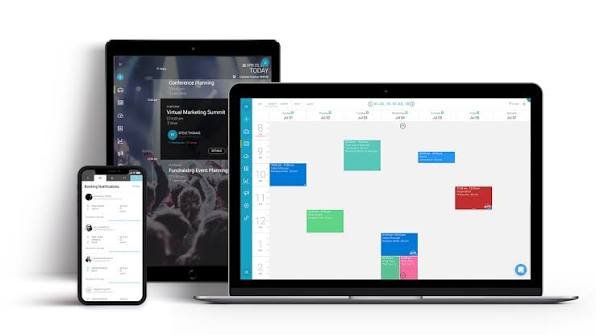
Appointment Scheduling Software: 7 Key Features Businesses Should Look For
Imagine a customer wants to book a consultation with your business. They visit your website, search for a phone number, call during working hours, and wait for someone to confirm an available time.
Now imagine they cannot get through. They might try again later, or they might simply book with another company.
This is a small example of how an inconvenient booking process can cost a business an opportunity.
Customers increasingly expect simple ways to schedule appointments without unnecessary calls, repeated messages, or long waiting times. For businesses, handling every booking manually can also become difficult as enquiries increase.
That is where appointment scheduling software can help.
It allows customers to view available time slots, make bookings, and receive confirmations through a structured digital process. Meanwhile, business owners and employees can manage schedules, cancellations, and appointment details from one place.
But choosing the right system requires more than finding a calendar with a booking button. Let’s look at seven important features and how they can improve everyday business operations.
What Is Appointment Scheduling Software?
Appointment scheduling software is a digital system that helps businesses manage customer bookings, staff availability, appointment times, and related communication.
Instead of relying entirely on phone calls, spreadsheets, or messaging applications, businesses can provide customers with an online booking experience.
Depending on the platform, the system may allow customers to:
- View available appointment slots
- Select a service
- Choose a preferred employee
- Book a convenient date and time
- Receive confirmation messages
- Reschedule or cancel appointments
- Make payments before the appointment
For businesses, it can reduce administrative work and make scheduling easier to manage.
Appointment scheduling software is useful for consultants, clinics, salons, educational institutions, repair services, fitness professionals, agencies, and many other service-based organizations.
7 Essential Appointment Scheduling Software Features
1. Real-Time Availability Management
One of the most important features is accurate availability.
Customers should not be able to book a time slot that has already been reserved by someone else.
A good scheduling system updates availability when appointments are created, changed, or cancelled.
It should also allow businesses to define:
- Working days and hours
- Employee availability
- Break periods
- Appointment durations
- Holidays and unavailable dates
- Booking limits
For example, a consulting company may have three consultants who work different schedules. The booking system should show each consultant’s actual availability rather than displaying one shared calendar without considering individual schedules.
This helps prevent double bookings and unnecessary scheduling confusion.
2. Easy Online Booking for Customers
Customers should not need instructions to understand how to book an appointment.
The booking process should be straightforward, whether someone is using a desktop computer, tablet, or smartphone.
Ideally, the customer should be able to:
- Select a service.
- Choose an available date.
- Pick a suitable time.
- Enter the required contact information.
- Confirm the appointment.
Avoid asking for unnecessary information during booking.
For example, a customer booking a short consultation may not need to complete a long registration form before selecting a time slot.
A simpler booking experience can reduce friction and make it easier for potential customers to take the next step.
3. Automated Appointment Reminders
People forget appointments. Sometimes they become busy, overlook a confirmation email, or simply lose track of the scheduled time.
Missed appointments can waste valuable working hours, especially for businesses that depend on scheduled consultations or service sessions.
Automated reminders help customers remember their bookings.
Depending on the platform and available integrations, reminders can be sent through:
- SMS
- In-app notifications
Businesses may also allow customers to confirm or reschedule through reminder messages.
For example, a clinic could send a reminder before an upcoming appointment so that the customer has enough time to confirm attendance or request a change.
The timing and communication frequency should be appropriate for the type of service.
4. Calendar Integration and Staff Scheduling
Many businesses already use digital calendars to manage their daily activities.
Appointment scheduling software should ideally integrate with commonly used calendar platforms so that employees can view their schedules without constantly switching between applications.
Useful capabilities include:
- Calendar synchronization
- Employee-specific schedules
- Shared team calendars
- Automatic availability updates
- Appointment assignment
- Time-zone support
Imagine a company with multiple sales representatives handling consultation bookings.
The scheduling system could show available slots for each representative and assign appointments according to predefined rules.
This makes it easier to distribute work and avoid unnecessary scheduling conflicts.
Before selecting software, check whether calendar synchronization works in both directions and how conflicts are handled.
5. Online Payments and Booking Deposits
For businesses that charge customers for appointments, payment integration can make the booking process more convenient.
Customers may be able to pay the full amount or a deposit when reserving their time slot.
This can be particularly useful for:
- Paid consultations
- Salon services
- Personal training sessions
- Professional workshops
- Repair appointments
- Online coaching
A suitable platform should clearly display service prices, accepted payment methods, and applicable cancellation or refund conditions.
Businesses should also check payment gateway compatibility, transaction charges, settlement timelines, and security requirements.
Do not assume every scheduling platform includes payment processing by default. Some require third-party integrations or paid plans.
6. Customer Information and Booking History
A booking is not just a date and time. It is also an opportunity to understand customer requirements and provide better service.
Appointment scheduling software can maintain useful information such as:
- Customer name and contact details
- Previous appointments
- Selected services
- Booking preferences
- Appointment status
- Relevant notes
For example, a consulting agency may want to know whether a customer has already attended an introductory consultation.
A salon may need to review a customer’s previous service selections.
Having appropriate booking history available can reduce repeated questions and improve service continuity.
However, businesses should collect only the information they genuinely need and protect customer records with suitable access controls.
7. Booking Reports and Business Analytics
A scheduling system can also help business owners understand how their appointments are performing.
Instead of manually counting bookings, businesses may be able to review reports showing:
- Total appointments
- Confirmed bookings
- Cancellations
- No-shows
- Popular services
- Peak booking hours
- Employee availability
- Revenue from paid appointments
These insights can support better decisions.
For example, if most customers request appointments on weekends, a business might consider extending its weekend availability.
If a particular service receives very few bookings, the company may need to review its pricing, promotion, or presentation.
Reports turn booking information into something useful for daily business planning.
Which Businesses Can Benefit From Appointment Scheduling Software?
Online scheduling is not limited to one industry. Almost any organization that works with appointments can benefit from a structured booking process.
Healthcare and Clinics
Clinics can use scheduling software to manage consultations, practitioner availability, patient bookings, and reminders.
For healthcare organizations, privacy, secure access, and compliance requirements deserve particular attention.
Salons and Beauty Businesses
Salons can display different services, durations, prices, and available employees.
Customers can select a suitable service and time without calling the reception desk.
Consulting and Professional Services
Consultants, accountants, agencies, and legal professionals can allow clients to schedule meetings based on available working hours.
This can reduce back-and-forth communication.
Education and Training
Educational institutions can use booking systems for counselling sessions, admission enquiries, training consultations, and parent meetings.
Home Repair and Maintenance Services
Service providers can organize customer visits, assign available technicians, and manage appointment changes.
For businesses offering on-site services, location and travel-time planning may also be necessary.
How to Choose the Right Appointment Scheduling Software
The best software is not necessarily the one with the longest feature list.
Start by understanding how your business actually handles appointments.
Understand Your Booking Requirements
Think about the number of appointments you receive, how long each service takes, and whether customers need to choose specific employees.
A solo consultant may need a simple calendar-based system. A multi-location business may require staff management, location selection, and more advanced scheduling rules.
Check Website Integration
Your booking system should fit naturally into your existing website.
Customers should be able to find the booking option without searching through multiple pages.
Check whether the platform supports website embedding, booking links, or API integrations.
Review Mobile Experience
Many customers book services using smartphones.
Test the entire booking process on a mobile device. Check the calendar, form fields, service selection, payment process, and confirmation screen.
Compare Pricing Carefully
Review subscription fees, booking limits, employee restrictions, payment charges, and premium features.
A platform that looks inexpensive initially may become costly when you add more employees or locations.
Check Data Security and Privacy
Customer booking information should not be accessible to everyone.
Look for appropriate account permissions, secure data handling, backup options, and privacy controls.
For businesses handling sensitive customer information, review applicable legal and regulatory requirements before selecting a provider.
Test Customer Support and Reliability
Scheduling is often part of daily business operations.
Check the provider’s support options, service availability, documentation, and process for resolving booking errors.
A system that becomes unavailable during busy periods can create unnecessary problems.
Common Appointment Scheduling Mistakes Businesses Should Avoid
Even a good booking platform can create a poor experience when it is not configured properly.
Watch out for these mistakes:
Offering incorrect availability: Keep employee schedules and unavailable dates updated.
Making booking forms too long: Ask only for information needed to manage the appointment.
Ignoring reminders: Customers may forget bookings without suitable notifications.
Forgetting cancellation policies: Clearly explain how customers can change or cancel appointments.
Not testing mobile booking: A difficult mobile experience can discourage customers.
Allowing duplicate bookings: Check how the system handles calendar conflicts and simultaneous booking attempts.
Ignoring booking reports: Regularly review cancellations, no-shows, and demand patterns.
How HiveRift Can Help Build a Custom Appointment Booking System
Sometimes an off-the-shelf scheduling tool does not match the way a business operates.
You may need custom appointment durations, employee assignment rules, customer dashboards, payment workflows, or integration with an existing CRM.
In such cases, a custom booking application may provide more flexibility.
At HiveRift, we work on custom software development, web application development, and API integrations that help businesses build digital systems around their operational requirements.
Whether you need a booking interface for your website or a more complete appointment management solution, explore HiveRift to understand how custom development can support your business.
Conclusion
Appointment scheduling software can make booking easier for customers and daily planning more manageable for businesses.
Features such as real-time availability, automated reminders, calendar integration, online payments, customer records, and booking reports can reduce administrative work and improve the overall experience.
However, the right choice depends on your services, team size, booking volume, and existing technology.
Start with the problems your business faces today. Then choose a system that solves those problems without making the booking process unnecessarily complicated.
A good appointment experience should make it easier for customers to do business with you, not give them another reason to leave.
Frequently Asked Questions (FAQs)
1. What is appointment scheduling software?
Appointment scheduling software is a digital tool that allows businesses to manage customer bookings, employee availability, appointment confirmations, cancellations, and reminders.
2. Is appointment scheduling software useful for small businesses?
Yes. Small businesses can use it to reduce manual booking work, manage available time slots, send reminders, and provide customers with convenient online booking options.
3. Can customers book appointments through a business website?
Yes. Many scheduling platforms provide website booking widgets, embedded calendars, or booking links that allow customers to reserve appointments online.
4. Does appointment scheduling software send automatic reminders?
Many platforms support automatic email and SMS reminders. Some also offer WhatsApp or other messaging integrations, depending on the provider and subscription plan.
5. Can appointment scheduling software accept online payments?
Yes. Some platforms support deposits and full payments through integrated payment gateways. Availability and transaction fees depend on the selected software.
6. Can multiple employees use one appointment scheduling system?
Yes. Many business scheduling platforms support multiple employees, individual calendars, service assignments, and shared availability management.
7. Should a business choose custom or ready-made appointment scheduling software?
Ready-made software may suit businesses with standard booking requirements. Custom software is worth considering when the business needs specialized workflows, integrations, permissions, or booking rules.


