



Business Process Mapping: 7 Steps to Take Before Software Development
Have you ever watched your team spend twenty minutes searching for information that should take two minutes to find?
Perhaps a customer request sits in someone’s inbox because nobody knows who should handle it. Maybe employees enter the same information into three different systems. Or a manager still needs to approve every small decision because the process has never been properly defined.
These problems can look like ordinary workplace frustrations. Over time, however, they slow down operations, increase mistakes, and make growth harder than it needs to be.
When a business decides to invest in new software, it is tempting to start discussing features immediately. But there is an important step worth taking first: understanding how the business actually works.
That is where business process mapping comes in.
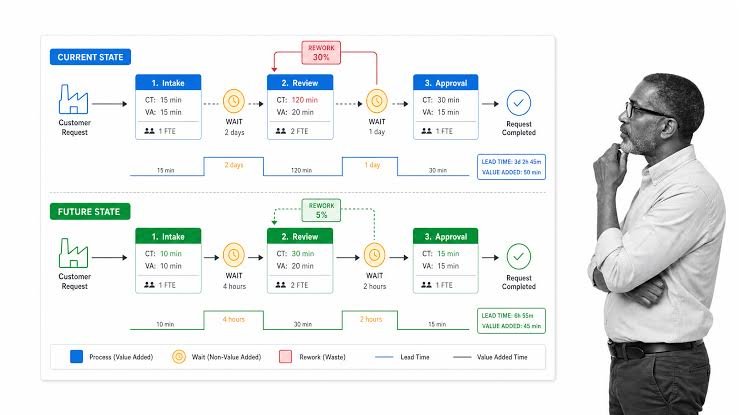
Business process mapping helps you visualise the steps involved in completing a task, from the first action to the final result. It shows who does what, where information moves, which decisions need to be made, and where delays occur.
Done properly, it gives your development team a much clearer picture of what your software needs to accomplish.
What Is Business Process Mapping?
Business process mapping is the practice of documenting a workflow so people can understand how work moves through an organisation.
Consider a simple customer order process.
A customer places an order. Someone checks availability, confirms the payment, prepares the order, arranges delivery, and updates the customer.
That sounds straightforward until you look closely.
Who checks the stock? What happens if an item is unavailable? Who handles a failed payment? How is the delivery team notified? What happens if the customer changes the order?
A process map makes these steps and decisions visible.
It can be as simple as a flowchart or as detailed as a diagram showing different departments, responsibilities, systems, and decision points.
The purpose is not to create complicated documentation for its own sake. It is to make the workflow understandable before you automate or improve it.
Why Should You Map a Process Before Building Software?
Software follows the rules and instructions it is given. If those rules are unclear, the resulting application may reproduce existing problems rather than solve them.
Imagine a business that wants an automated employee leave management system. The team asks developers to create a leave request form, an approval button, and a calendar.
During development, important questions begin to appear.
Can employees cancel approved leave? Who approves requests when a manager is unavailable? What happens when two employees request the same critical shift? Are different rules applicable to different employee groups?
These are business-process questions as much as technical questions.
Mapping the process before development helps you identify these details early, when they are easier to discuss and incorporate into the project plan.
It can also help you avoid paying to automate unnecessary steps or rebuilding features because the original requirements were incomplete.
1. Identify the Process You Actually Need to Improve
Start with one process rather than trying to document your entire business at once.
Choose a workflow that causes noticeable frustration, consumes too much employee time, creates repeated errors, or affects customer experience.
Examples include:
- Handling incoming customer enquiries.
- Processing orders and payments.
- Managing inventory updates.
- Approving employee expenses.
- Scheduling appointments.
- Preparing invoices and reports.
- Handling customer complaints.
Be specific about the problem.
Instead of saying, “Our customer service needs improvement,” define the issue more clearly: “Customer enquiries are sometimes missed because messages arrive through several channels and there is no shared tracking system.”
The second statement gives you something concrete to investigate.
It also helps you avoid choosing software simply because it has an impressive feature list. You can evaluate every proposed feature against the problem it is meant to solve.
2. Document How the Work Happens Today
Before designing an ideal workflow, understand the existing one.
Talk to the employees who perform the work every day. Ask them what they do first, which tools they use, who they contact for help, and what happens when something goes wrong.
Managers may understand the overall procedure, but the people carrying out the tasks often know where the real delays occur.
For example, a manager might believe that every order is processed through the company’s main system. Employees may reveal that certain orders are recorded in a spreadsheet first because the system cannot handle a particular situation.
That workaround matters. If it is ignored, the new software may miss an important operational requirement.
Document the steps in their current order. Include the people involved, information required, systems used, approvals needed, and exceptions that regularly occur.
Do not worry about making the existing process look perfect. The purpose of this stage is to understand reality, not to defend the way things have always been done.
3. Find the Delays, Repeated Work, and Confusing Decisions
Once the current workflow is visible, look for the points where work slows down or becomes unnecessarily complicated.
Common problems include waiting for approvals, entering the same information repeatedly, switching between disconnected tools, unclear responsibilities, and unnecessary handoffs between departments.
Consider an invoice approval process.
An employee prepares an invoice, emails it to a manager, waits for a response, follows up, and then manually updates another system after approval.
The delay might not be caused by the invoice itself. It may come from the way approvals and updates are handled.
Ask practical questions:
- Which step takes the longest?
- Where does work regularly get stuck?
- Which information is entered more than once?
- What mistakes happen repeatedly?
- Which decisions depend on one particular person?
- What happens when the usual process cannot be followed?
Where possible, collect real examples and basic measurements. Even a simple record of how long approvals take or how many requests require correction can reveal useful patterns.
Avoid assuming that every manual task should be automated. Some manual checks exist for good reasons, particularly when money, compliance, or sensitive information is involved.
The goal is to remove unnecessary friction while preserving important controls.
4. Design a Better Workflow Before Choosing Features
After understanding the current process, decide how it should work in the future.
This is an opportunity to simplify the workflow before turning it into software.
Suppose employees currently submit expense claims by email. Managers request missing receipts, finance checks the information, and employees receive updates through separate messages.
A better process might use a single submission form, automatic notifications, a defined approval path, and a central record of each claim’s status.
Notice that the improvement is not simply “build an expense management application.” It is a clearer process with defined responsibilities and fewer unnecessary handoffs.
When designing the improved workflow, consider:
- Which steps are essential?
- Which steps can be removed or combined?
- Which decisions can follow clear business rules?
- Where is human approval still necessary?
- What information should be available to each person?
- How will exceptions be handled?
Document the proposed process and review it with the employees who will use it.
If the new workflow is confusing on paper, software is unlikely to make it magically simple.
5. Turn the Process Map Into Clear Software Requirements
This is where business process mapping becomes particularly valuable for development teams.
A process map describes how work should happen. Software requirements explain what the application must do to support that workflow.
For example, a mapped order approval process might lead to requirements such as:
- Employees can create and submit orders.
- The system validates required order information.
- Orders above a defined value require additional approval.
- Approvers receive notifications when action is needed.
- Users can view the current order status.
- Every approval or rejection is recorded.
- Rejected orders return to the appropriate employee with an explanation.
These requirements are more useful than a general instruction to “build an order management system.”
They provide a basis for estimating the project, planning the user interface, designing the database, and testing the finished application.
You can also identify which features are essential for the first release and which can wait until later.
For more information about structured requirements and process improvement, the Business Process Management resources from IBM offer a useful starting point.
6. Define Who Is Responsible for Each Step
A process can appear simple until something goes wrong and nobody knows who should act.
Clear responsibilities are essential when software includes approvals, notifications, shared records, or multiple departments.
For every important step, establish who performs the task, who approves it, who needs to be informed, and who handles exceptions.
Consider a customer refund.
A support employee may submit the request, a manager may approve refunds above a certain amount, and the finance team may complete the payment. The system should reflect those responsibilities instead of allowing every user to perform every action.
This is also a good time to discuss user permissions.
Employees should have the access they need to do their jobs, without automatically receiving access to every record or administrative function.
Write down the rules clearly enough that a developer can implement them and a tester can verify them.
You do not need to document every tiny action in advance. Focus on decisions and responsibilities that affect how the process operates.
7. Test the Proposed Process Before Full Development
Before investing in a complete application, walk through the proposed workflow with realistic examples.
You can use a simple diagram, a clickable prototype, a spreadsheet, or a small test version of the process.
Imagine testing a customer complaint workflow.
What happens when a complaint is submitted? Who receives it? Can it be reassigned? What happens if the customer responds after the case is closed? How does a manager identify unresolved complaints?
Run through normal situations as well as exceptions.
Involve the employees who will use the system. They may notice missing steps that were not obvious during planning.
This early review can uncover confusing approval rules, missing notifications, unclear statuses, or unnecessary data collection before those decisions become expensive development changes.
Once the workflow is agreed upon, the development team can work from a much stronger foundation.
You can then test the completed software against the documented requirements rather than relying on subjective impressions of whether it looks finished.
A Simple Example: From Manual Work to a Clear Digital Process
Imagine a small service company that manages customer appointments through phone calls, emails, and a shared spreadsheet.
The existing process looks like this:
Customer enquiry → Employee checks availability → Appointment is recorded → Customer receives confirmation → Staff member prepares for the visit
During mapping, the company discovers that employees sometimes book the same time slot because updates are not visible immediately. Customers also call repeatedly because they are unsure whether their appointments have been confirmed.
The improved process might look like this:
Customer enquiry → Availability is checked in one system → Appointment is recorded → Confirmation is sent → Staff receive the required details
The proposed software might need shared availability, duplicate-booking prevention, confirmation messages, and a central appointment record.
Notice what happened. The business did not begin by asking for dozens of features. It identified the operational problem and used the process map to determine which features were actually necessary.
That is the value of mapping a process before software development.
Common Business Process Mapping Mistakes to Avoid
Process mapping is useful, but only when it reflects how the business works.
Watch out for these common mistakes:
Mapping assumptions instead of reality. A written policy may differ from what employees actually do. Speak to the people performing the work.
Making the diagram unnecessarily complicated. A process map should clarify the workflow, not become another document nobody wants to read.
Ignoring unusual situations. Cancellations, missing information, rejected approvals, and system failures can be just as important as the normal workflow.
Automating every existing step. Some steps may be unnecessary and should be removed before software is built.
Leaving employees out of the discussion. People who use the process can identify practical problems that management may overlook.
Failing to update the documentation. If the process changes, the map and related requirements should be reviewed so they do not become misleading.
Keep the documentation proportionate to the project. A small internal tool may need a straightforward flowchart and a list of requirements. A complex application involving several departments may need more detailed diagrams and approval rules.
How Business Process Mapping Helps Control Development Costs
Software budgets can grow when important requirements are discovered late.
A missing approval rule might require a database change. An overlooked exception might require a new workflow. A misunderstood responsibility might lead to changes in permissions and notifications.
Each late change can affect the design, code, testing, and release schedule.
Business process mapping cannot prevent every change, but it can reduce avoidable misunderstandings by giving stakeholders a shared view of the intended workflow.
It also helps businesses prioritise spending.
Instead of building every requested feature immediately, you can focus on the changes most likely to save time, reduce errors, improve customer service, or support business growth.
Before approving development, make sure you can explain the problem, the proposed process, the expected outcome, and the essential features needed to support it.
That clarity is useful whether you are hiring an external developer, working with an internal team, or evaluating an existing software product.
Conclusion: Understand the Work Before Automating It
New software can improve the way a business operates, but only when it supports a process that makes sense.
Business process mapping helps you understand how work currently happens, identify unnecessary delays, clarify responsibilities, and define what your future software must accomplish.
Start with one important workflow. Speak to the people who perform it, document the actual steps, identify the main problems, and design a clearer process. Then turn that process into practical software requirements and test your assumptions before full development begins.
You do not need a complicated diagram or a large consulting project to get started. Even a simple, well-discussed flowchart can uncover problems that have been slowing your team down for months.
If you are planning a new business application or improving an existing digital system, visit HiveRift US to explore technology solutions aligned with your business requirements.
The smartest software projects do not begin with code alone. They begin with a clear understanding of the work the software is supposed to improve.
Frequently Asked Questions
1. What is business process mapping?
Business process mapping is the practice of visually documenting the steps, decisions, people, and systems involved in completing a business task.
2. Why is process mapping important before software development?
It helps teams understand actual workflows, identify inefficiencies, clarify responsibilities, and define software requirements before development begins. This can reduce misunderstandings and avoidable rework.
3. What tools can I use for business process mapping?
You can begin with a whiteboard, a spreadsheet, or a flowchart tool. More complex workflows may benefit from specialised process modelling software. The best tool is one your team can understand and maintain.
4. Who should participate in business process mapping?
Include the people who perform the work, relevant managers, and stakeholders responsible for approvals or compliance. Developers can also contribute when technical systems and integrations affect the workflow.
5. Does every software project need detailed process maps?
No. The level of detail should match the project’s complexity. A small application may need only a simple workflow diagram and clear requirements, while a larger system may need detailed process documentation.
6. Can business process mapping reduce software development costs?
It can help reduce avoidable rework by identifying missing requirements and unclear decisions early. Actual savings depend on the project, the quality of the mapping, and how well the agreed requirements are followed.


