



Technical Debt: 7 Signs Your Software Needs Attention
Your software worked perfectly when it was first launched. New features were easier to add, updates took less time, and fixing a small issue rarely caused a headache.
Then, gradually, things started changing.
A simple update began taking days instead of hours. Fixing one bug created another. Developers became nervous about touching certain parts of the code. And every new feature seemed to cost more than the last one.
If this sounds familiar, your business may be dealing with technical debt.
Technical debt is not always a sign that your developers did a bad job. Sometimes businesses make shortcuts to meet deadlines, respond to changing requirements, or launch a product with limited resources. Those decisions can be reasonable at the time. Problems arise when the shortcuts accumulate and nobody makes time to address them.
Understanding technical debt can help you protect your software investment, control maintenance costs, and keep your business moving forward without constantly fighting yesterday’s decisions.
What Is Technical Debt?
Technical debt refers to the future cost of choosing a quick or less effective technical solution instead of a more sustainable one.
Imagine building a house and deciding to postpone a small repair because you need to move in quickly. That decision may be manageable initially. But if you keep postponing maintenance, a minor problem can become much more expensive later.
Software can develop similar problems.
A developer might duplicate code to finish a feature quickly. A team might skip useful documentation because a deadline is approaching. An application might rely on an outdated library because upgrading it requires careful testing.
Each decision can create extra work for the future.
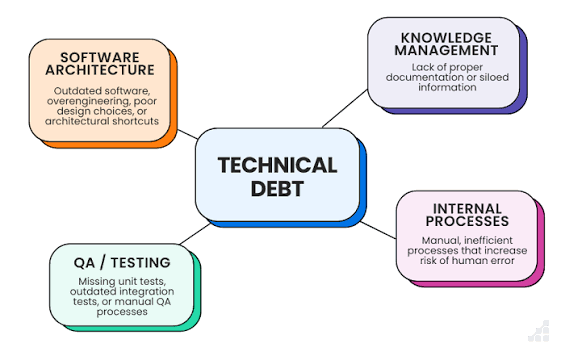
Technical debt can include:
- Complicated or duplicated code.
- Outdated software dependencies.
- Missing or confusing documentation.
- Weak automated testing.
- Temporary fixes that become permanent.
- Software architecture that makes changes unnecessarily difficult.
The important point is that technical debt is not simply old code. Well-maintained software can run for years, while recently developed software can accumulate serious debt if important decisions are repeatedly postponed.
7 Signs Your Business Is Accumulating Technical Debt
1. Every New Feature Takes Longer to Build
A feature that once seemed straightforward now requires developers to investigate several unrelated parts of the application.
They may need to work around old code, understand undocumented behaviour, or make changes in multiple places just to deliver one improvement.
This can be a sign that the software has become unnecessarily difficult to change.
For example, adding a new payment option should not routinely require rewriting unrelated customer account functionality. If it does, the underlying design may need attention.
Not every complex feature indicates technical debt. However, when development repeatedly slows down for similar reasons, it is worth investigating.
2. Fixing One Bug Creates Another
A customer reports an issue. Your team fixes it, tests the affected screen, and releases the update.
A few hours later, another part of the application stops working.
This can happen when different components are tightly connected or when the team lacks sufficient automated tests. A change intended for one feature may unintentionally affect several others.
The result is a frustrating cycle: developers spend more time repairing existing functionality and less time improving the product.
A sensible response is to identify recurring failures, understand why they occur, and strengthen testing around the affected areas rather than relying on repeated emergency fixes.
3. Nobody Wants to Touch Certain Parts of the Code
Sometimes a development team knows that a particular module is difficult to work with.
Perhaps only one developer understands it. Maybe its original purpose is unclear, or changing it has caused problems in the past.
When the team begins avoiding a part of the application, that hesitation is worth taking seriously.
The solution is not necessarily to rewrite everything. It may involve documenting the module, adding tests, simplifying its structure, or gradually replacing its most problematic components.
The goal is to make future changes safer and less dependent on one person’s memory.
4. Your Software Depends on Outdated Libraries
Applications often rely on third-party libraries, frameworks, and packages to perform common tasks.
Over time, those dependencies may stop receiving support, lose compatibility with newer tools, or develop security vulnerabilities.
An outdated dependency is not automatically dangerous, but ignoring it indefinitely can create avoidable risks.
Your team should maintain an inventory of important dependencies, review security advisories, and plan upgrades according to their impact and urgency.
The OWASP Foundation provides useful resources on application security, including risks associated with vulnerable and outdated software components.
5. Testing Happens Only Before a Major Release
If your team depends almost entirely on manual testing, even a small update can become stressful.
Someone must remember which screens to check, which workflows might be affected, and which previous problems could return. As the product grows, that process becomes harder to manage.
Automated tests can help catch certain problems earlier and make routine changes more predictable.
Not every test needs to be automated immediately. Start with critical business workflows, such as account access, payments, bookings, or important data processing. Expand coverage as the application evolves.
Testing does not eliminate every defect, but it gives the team greater confidence when making changes.
6. New Developers Take Too Long to Understand the Product
A growing business may eventually need additional developers. But onboarding becomes difficult when important decisions exist only in people’s heads.
New team members may struggle to understand how different components connect, why certain approaches were chosen, or how to safely run and test the application.
This can lead to repeated questions, avoidable mistakes, and delays whenever someone leaves or changes responsibilities.
Useful documentation does not have to be enormous. Clear setup instructions, architectural notes, coding conventions, and explanations of unusual decisions can make a meaningful difference.
Good documentation is particularly valuable when a product has been maintained by several people over time.
7. Maintenance Is Consuming Your Development Budget
One of the clearest warning signs is a steady increase in the time and money spent keeping existing software operational.
Your team may spend most of its capacity investigating recurring issues, applying workarounds, upgrading neglected dependencies, or correcting problems caused by earlier changes.
Meanwhile, customer requests and business improvements remain unfinished.
Technical debt can contribute to this situation, although poor requirements, changing priorities, and operational problems can also play a role.
Review where development time is going. If maintenance work keeps increasing, identify the main sources of friction and estimate what it would take to address them.
The objective is not to eliminate all maintenance. Every useful software product requires ongoing care. The objective is to stop avoidable problems from consuming an unreasonable share of your resources.
What Causes Technical Debt in the First Place?
Technical debt rarely comes from one decision alone. It usually develops through a combination of business pressure and technical compromises.
Tight deadlines: Teams may choose a temporary solution to meet a launch date, with the intention of improving it later.
Changing requirements: A product may evolve beyond the assumptions behind its original design.
Limited testing: When testing is rushed or incomplete, defects and fragile behaviour can remain hidden.
Lack of maintenance planning: Businesses often budget for new features but forget to allocate time for upgrades, cleanup, and documentation.
Growing complexity: As more integrations, users, and workflows are added, an application may need a different structure than it did at launch.
Unclear ownership: When nobody is responsible for reviewing dependencies, code quality, or recurring technical problems, small issues can remain unresolved.
These causes are not always avoidable. What matters is whether the business recognises the trade-offs and makes time to manage them.
How to Reduce Technical Debt Without Rebuilding Everything
The phrase “technical debt” can make a complete rewrite sound like the obvious answer. In practice, rebuilding an entire application is expensive and introduces its own risks.
A more practical approach is to address the problems that matter most.
Step 1: Identify the Biggest Sources of Friction
Ask your developers which parts of the application take the longest to change, produce repeated bugs, or create the most maintenance work.
Review incident records, support tickets, failed deployments, dependency reports, and recurring customer complaints.
Look for patterns rather than assuming every old component needs replacement.
Step 2: Prioritise by Business Impact
Not all technical debt deserves immediate attention.
A security vulnerability in a critical dependency may require urgent action. A confusing internal module that rarely changes might be a lower priority.
Consider three factors:
- Risk: Could the issue affect security, data integrity, or service reliability?
- Cost: How much time or money does it currently consume?
- Frequency: How often does the problem interfere with development or operations?
This helps your team focus on work that delivers meaningful value instead of cleaning up code simply because it looks untidy.
Step 3: Reserve Time for Maintenance
If every development cycle is dedicated to new features, technical debt will rarely receive attention.
Set aside a realistic portion of development capacity for dependency updates, refactoring, test improvements, documentation, and reliability work.
The exact allocation depends on the product and its current condition. The important thing is to make maintenance part of normal planning rather than waiting for a crisis.
Step 4: Improve the Code Gradually
Refactoring means improving the internal structure of software without intentionally changing its external behaviour.
For example, developers might simplify a complicated function, remove duplicated logic, or separate responsibilities that have become tangled together.
When done in small, tested steps, refactoring can reduce complexity without requiring a complete rewrite.
For more guidance on maintainable software practices, the Martin Fowler website offers articles and explanations covering refactoring, software design, and development processes.
Step 5: Make Prevention Part of the Workflow
Fixing existing technical debt is only half the job. Your team also needs practices that prevent unnecessary debt from accumulating again.
Useful measures include code reviews, automated tests, dependency checks, clear acceptance criteria, and documentation for important architectural decisions.
These practices should fit the size and risk profile of your project. A small internal tool may need a simpler process than a payment platform handling sensitive customer information.
The goal is to make sustainable development the normal way of working—not an occasional cleanup project.
Should You Fix Technical Debt or Build New Features First?
This is a common challenge for business owners. New features are visible to customers, while technical improvements can seem like work happening behind the scenes.
The right choice depends on the consequences of delaying each task.
If technical debt is causing frequent failures, slowing critical releases, or creating security risks, addressing it may be more valuable than adding another feature.
If the existing software is stable and a proposed improvement offers clear customer value, the new feature may deserve priority.
Sometimes the best option is to combine both. While developing a new feature, the team can improve the specific component that would otherwise make the work unnecessarily difficult.
A useful question to ask is: Will this decision make the next six months of development easier or harder?
You do not need to eliminate every technical shortcut before moving forward. You need to understand which shortcuts are becoming expensive and manage them deliberately.
How HiveRift Can Help Your Software Stay Maintainable
Software should support your business as it grows, not make every improvement harder than the last one.
When planning a new application or reviewing an existing system, it helps to look beyond the immediate feature list. Maintainability, testing, documentation, security, and future requirements all influence the long-term value of a software investment.
Explore HiveRift’s website to learn more about its digital solutions and discuss your project’s requirements.
Before committing to a major rewrite, begin by identifying the real problem, understanding its business impact, and creating a practical improvement plan.
Conclusion: Manage Technical Debt Before It Controls Your Roadmap
Technical debt is a normal part of software development, but unmanaged debt can gradually make a product more expensive, less reliable, and harder to improve.
The warning signs often appear in everyday work: small features take longer, bugs keep returning, upgrades become stressful, and maintenance consumes more of the budget.
You do not need to fix everything at once. Start with the problems that create the greatest risk or repeatedly slow down your team. Improve testing, maintain dependencies, document important decisions, and make room for regular maintenance.
Good software is not software that never needs improvement. It is software that can be improved without unnecessary pain.
Frequently Asked Questions (FAQs)
1. What is technical debt in software development?
Technical debt is the future work or cost created by technical shortcuts, design compromises, or postponed improvements. It can make software harder to maintain, test, secure, and extend.
2. Is technical debt always bad?
No. A deliberate shortcut can help a business meet a deadline or test an idea. It becomes a problem when its consequences are ignored, the cost keeps increasing, or it creates unacceptable risks.
3. How can I tell if my software has technical debt?
Common signs include recurring bugs, slow feature development, outdated dependencies, limited test coverage, poor documentation, and increasing maintenance costs. These signs should be investigated rather than automatically attributed to technical debt.
4. Does technical debt mean my software needs a complete rewrite?
Usually, not necessarily. Many issues can be addressed through targeted refactoring, dependency upgrades, better tests, documentation, and gradual architectural improvements. A rewrite should be considered only after its benefits and risks have been evaluated.
5. How often should technical debt be reviewed?
Review it regularly as part of development planning, and reassess priorities after major releases, incidents, architectural changes, or significant growth in the product’s usage.
6. Who is responsible for managing technical debt?
Developers help identify and address technical issues, while technical leads and product managers help prioritise the work. Business stakeholders should understand the risks and provide realistic time and budget for necessary maintenance.
7. Can technical debt affect business growth?
Yes. When it makes releases slower, maintenance more expensive, or reliability harder to maintain, technical debt can limit how quickly a business improves its software and responds to customer needs.


