



Headless CMS: A Smarter Way to Manage Content
Imagine updating a product description on your website and then having to make the same change separately in your mobile app, customer portal, and other digital channels.
It is repetitive, takes time, and creates opportunities for information to become inconsistent.
As businesses expand across digital platforms, managing content can become more complicated than it first appears. A traditional content management system may work perfectly for a simple website, but businesses with more complex needs sometimes require a different approach.
That is where a headless CMS comes in.
A headless CMS separates the place where content is created and managed from the way that content appears to customers. This separation gives development teams more flexibility when building digital experiences across different platforms.
But does every business need one? Not necessarily. Understanding how it works, where it helps, and what it requires can help you make a more informed decision.
What Is a Headless CMS?
A headless CMS is a content management system that stores and organizes content separately from the presentation layer that displays it.
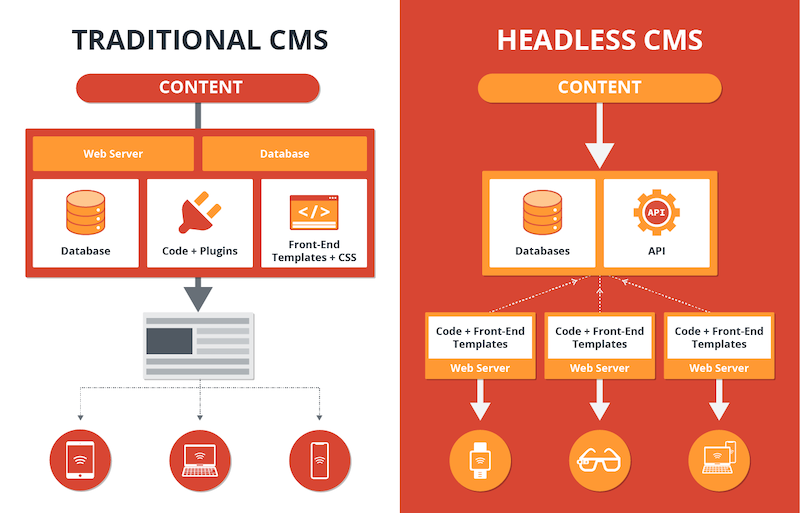
In a traditional CMS, the content management system and website presentation are often closely connected. You create a page, select a template, add content, and publish it through the same system.
A headless CMS works differently. It manages the content and makes it available through an API, allowing websites, applications, and other compatible platforms to retrieve the information they need.
For example, a business might store product descriptions, images, FAQs, and company announcements in one content system. Its website and mobile application can then use that content while presenting it in different ways.
The content remains centrally managed, but the experience can be designed separately for each platform.
How Does a Headless CMS Work?
The basic process is easier to understand when you break it into a few steps.
1. Content Is Created
A content editor adds information such as blog articles, product details, images, or announcements through the CMS interface.
The system organizes the content into structured fields, making it easier to reuse.
2. Content Is Stored Centrally
Instead of being tied to one particular webpage layout, content is stored as structured information.
For instance, a product entry might include its name, description, image, price, and category.
3. An API Makes the Content Available
An API allows other software to request the relevant content from the CMS.
Depending on the platform, this may use REST, GraphQL, or another supported interface.
4. The Website or Application Displays It
Developers build the presentation layer using the technologies appropriate for the project. The website, mobile app, or another connected platform retrieves the content and displays it for its users.
This architecture separates content management from presentation, allowing the two parts to evolve more independently.
The Benefits of Using a Headless CMS
1. Content Can Be Reused Across Platforms
One of the main advantages is the ability to manage shared content centrally.
Suppose a company publishes product information across its website and mobile application. With a suitable headless CMS setup, both platforms can retrieve information from the same content source.
This can reduce duplicate editing and help keep information consistent.
However, each platform still needs the correct integration, content formatting, and publishing workflow. A headless CMS does not automatically connect every channel without development work.
2. Developers Get More Design Flexibility
A headless CMS does not force the presentation layer to follow one specific website theme.
Development teams can choose suitable frontend technologies and design experiences that match the business’s needs.
This can be useful for businesses building custom websites, digital products, or several different customer-facing interfaces.
It also means the frontend can sometimes be updated without replacing the content management system, provided the integration remains compatible.
3. Content Teams Can Work More Independently
Content editors should not need to understand every technical detail of the website to update an article or announcement.
A well-configured headless CMS gives content teams a dedicated interface for creating, editing, reviewing, and publishing content.
Meanwhile, developers can focus on the presentation layer, integrations, and technical improvements.
The exact level of independence depends on how the CMS and publishing workflow are configured.
4. It Can Support Growing Digital Operations
A business may begin with a website and later add a mobile application, a customer portal, or other digital touchpoints.
A headless architecture can make it easier to reuse structured content across these experiences.
That flexibility can be valuable when a company has a clear multi-platform strategy. For a simple website that rarely changes, however, the additional architecture may not provide enough benefit to justify its complexity.
5. It Can Support Modern Website Performance Strategies
Because the frontend is separate, developers can use approaches such as static generation, caching, and optimized content delivery where appropriate.
These techniques may improve page speed and resilience, but a headless CMS alone does not guarantee a faster website.
Performance still depends on the frontend implementation, hosting, media optimization, caching configuration, and how content is requested.
Headless CMS vs. Traditional CMS
Both approaches can be useful. The right choice depends on how your business creates and publishes content.
A traditional CMS often provides an integrated way to manage content, themes, templates, and pages. This can make it easier for a team to launch and maintain a conventional website without building a separate frontend application.
A headless CMS focuses on content management and exposes content for separate presentation layers. It can offer more architectural flexibility, but it may require additional development and technical maintenance.
Consider these differences:
- Website setup: Traditional CMS platforms often offer ready-made themes and page-building tools. Headless setups may require a separately developed frontend.
- Content distribution: Headless systems are designed to make content available to different connected platforms.
- Technical requirements: A headless setup commonly requires more integration and development expertise.
- Editorial workflow: Traditional systems may provide familiar visual editing tools out of the box, while headless systems vary in preview and editing capabilities.
- Maintenance: A headless project may involve maintaining separate frontend hosting, API integrations, and content infrastructure.
Neither option is automatically better. A traditional CMS can be the practical choice for a small company website, while a headless CMS may make sense when content needs to serve several different experiences.
When Should a Business Consider a Headless CMS?
A headless CMS is worth exploring when content management has become a genuine operational challenge.
For example, it may be suitable if:
- Your business publishes content across several digital platforms.
- Multiple websites or applications need to use shared information.
- Your development team needs greater control over the frontend.
- Your content model is complex and requires structured, reusable information.
- Your organization has the technical resources to maintain integrations and publishing workflows.
On the other hand, if you manage a straightforward business website and mainly publish ordinary pages and blog posts, a traditional CMS may already meet your needs.
The goal is not to adopt the newest architecture. It is to choose a system that solves your current problems without introducing unnecessary complexity.
Common Challenges to Understand Before Choosing a Headless CMS
The flexibility of a headless CMS comes with responsibilities.
More Development Work
Separating the frontend from content management means developers must build and maintain the connection between them.
Page templates, navigation, content previews, and publishing behavior may require additional implementation.
SEO Needs Deliberate Planning
A headless website can perform well in search, but important SEO elements must be handled correctly.
Developers need to consider page titles, meta descriptions, canonical URLs, structured data, XML sitemaps, redirects, and how search engines access rendered content.
The frontend should also provide reliable page URLs and useful metadata for every indexable page.
Preview and Publishing Workflows Need Attention
Content editors often want to preview an article before it goes live.
In a headless setup, preview functionality may need to be configured between the CMS and frontend. Draft content should remain appropriately restricted, and publishing changes should reach the correct platforms.
Security and Maintenance Still Matter
A headless architecture is not automatically secure.
Businesses should manage API access carefully, protect credentials, keep software dependencies updated, and apply suitable permissions to content editors and connected systems.
There may also be separate infrastructure to monitor and maintain.
How to Choose the Right Headless CMS
Start by understanding how your team works today.
Ask which content is duplicated, which platforms need access to shared information, and where editors struggle to publish updates.
Then evaluate potential platforms against practical requirements:
- Content modeling: Can the CMS organize your content in a way that matches your business?
- API capabilities: Can your website and other applications retrieve content reliably?
- Editorial experience: Can your content team create, review, and publish information comfortably?
- Preview and publishing: Can editors verify content before it becomes public?
- Security: Does the platform support suitable access controls and credential management?
- Cost and maintenance: Consider subscriptions, development, hosting, integrations, and ongoing support.
- Future flexibility: Will the architecture support the digital experiences you genuinely expect to build?
Before committing to a full migration, consider testing the approach with a small section of your website. A limited pilot can help reveal technical challenges and editorial requirements before the business invests more heavily.
How HiveRift US Can Help With Your Digital Plans
Choosing a content architecture is an important part of planning a digital project. The decision affects how content is managed, how the website is developed, and how future changes are handled.
If your business is planning a new website or evaluating ways to improve its digital presence, visit HiveRift US to explore its digital development offerings and discuss your project requirements.
Before starting, identify your content needs, the platforms you want to support, your SEO requirements, and the resources available for ongoing maintenance.
A good technical decision should make everyday work easier for your team while supporting the experience your customers expect.
Conclusion
A headless CMS offers businesses a flexible way to manage structured content independently from the websites and applications that display it.
It can be particularly useful when several digital platforms need to share information or when developers require greater control over the frontend.
However, the approach also introduces additional development, integration, SEO, and maintenance considerations.
For a simple website, a traditional CMS may remain the better option. For a business with more complex content requirements and a clear multi-platform strategy, a headless CMS may provide meaningful long-term flexibility.
Start with your actual needs, compare the available approaches, and choose the architecture that offers the best balance of usability, cost, and maintainability.
Frequently Asked Questions
1. What is a headless CMS in simple terms?
A headless CMS manages content separately from the website or application that displays it. Connected platforms retrieve the content through an API and present it in their own layouts.
2. Is a headless CMS better than WordPress?
Not always. WordPress can be an excellent choice for many business websites and supports headless use cases as well. A separate headless CMS may be useful when content must serve multiple platforms or the frontend requires a different architecture.
3. Does a headless CMS improve SEO?
Not automatically. Search performance depends on factors such as content quality, technical SEO, page speed, rendering, metadata, internal links, and crawlability. A properly developed headless website can support these requirements.
4. Is a headless CMS suitable for small businesses?
It can be, but the additional development and maintenance may not be worthwhile for a small website with straightforward content needs. Evaluate the actual benefits before choosing it.
5. Can a headless CMS manage multiple websites?
Yes, many headless CMS platforms can provide shared content to multiple websites or applications. The exact capabilities depend on the platform, content structure, permissions, and integrations.
6. Does a headless CMS require developers?
Usually, developers are needed to build or maintain the frontend and connect it to the CMS. Content editors may be able to manage everyday publishing independently once the system is configured.
7. Is migrating to a headless CMS difficult?
The difficulty depends on the existing website, content volume, integrations, SEO requirements, and frontend design. A planned migration should include content mapping, URL and redirect planning, testing, and a clear rollback strategy.


