



Website Redesign: How to Upgrade Your Business Website the Right Way
A business website can look perfectly fine on the surface and still be holding the business back.
Maybe visitors struggle to find important information. Maybe the design feels outdated compared with your competitors. Perhaps your team has to work around limitations every time you want to add a new page, update content, or introduce a feature.
These problems rarely appear overnight. They build up gradually, until the website no longer reflects the quality, goals, or direction of the business.
That is where a website redesign can make a meaningful difference.
Redesigning a website is not simply about choosing new colours, changing fonts, or adding attractive animations. It is about understanding what is not working, deciding what needs to improve, and creating a better experience for the people who visit your website.
In this guide, we will explore when a redesign makes sense, how to plan one, which mistakes to avoid, and how to make sure your new website supports your business goals.
What Is a Website Redesign?
A website redesign involves improving the structure, appearance, functionality, and overall experience of an existing website.
Depending on your needs, the project might involve a visual refresh, a better navigation system, updated content, improved mobile layouts, technical improvements, or a completely new website structure.
For example, a company might have a website that looks attractive on a desktop but becomes difficult to use on a mobile phone. Another business might have useful information spread across too many pages, making it difficult for customers to understand what it offers.
Both websites could benefit from a redesign, but the solutions would be different.
The important thing is to begin with the problem rather than the design.
7 Signs Your Business Website Needs a Redesign
Not every business needs a completely new website. However, certain warning signs suggest that your current website deserves a closer look.
1. Your Website No Longer Reflects Your Brand
Businesses change over time. Services evolve, audiences become more specific, and brand identities mature.
If your website still reflects an older version of your business, visitors may not get an accurate picture of what you offer today.
A redesign gives you an opportunity to update your messaging, visuals, service descriptions, and overall presentation so that everything feels consistent.
2. Visitors Struggle to Find Information
Imagine a potential customer visiting your website to learn about your services. They click through several pages, search for basic details, and eventually leave without taking action.
That is a frustrating experience for the visitor and a missed opportunity for your business.
Clear navigation, descriptive page headings, logical page structures, and accessible contact information can make a website much easier to use.
3. The Mobile Experience Is Poor
People browse websites on phones, tablets, laptops, and desktop computers. Your website should remain useful regardless of screen size.
If buttons are difficult to tap, text is uncomfortable to read, or important content disappears on smaller screens, the mobile experience needs attention.
Google also uses the mobile version of a website’s content for indexing, making mobile usability an important consideration for search visibility.
4. Your Website Is Difficult to Update
A website should help your team work efficiently, not turn every small change into a technical headache.
If updating a service description requires complicated work or adding new content feels unnecessarily difficult, your current website structure or content management setup may no longer suit your needs.
A redesign can simplify the process and make everyday website management more practical.
5. Your Content Is Outdated or Unclear
Your website may have been designed well when it launched, but its content might no longer answer the questions your customers ask today.
Old service descriptions, missing details, unclear calls to action, and outdated company information can create confusion.
A redesign is a good time to review every important page and ask a simple question: does this information help visitors understand the business and decide what to do next?
6. Visitors Are Not Taking the Actions You Want
A website can attract traffic without generating meaningful enquiries, registrations, purchases, or calls.
The issue might be unclear messaging, weak calls to action, confusing forms, or a mismatch between what visitors expect and what the page delivers.
Before redesigning, examine your existing website data to understand where visitors lose interest. The goal is to solve actual usability or conversion problems rather than assuming a new visual style will fix everything.
7. Your Website Cannot Support Future Plans
Perhaps you want to introduce new services, publish more content, integrate business tools, or expand into new markets.
If your current website makes these changes unnecessarily difficult, its structure may be limiting future growth.
A thoughtful redesign should consider not only what your business needs today but also which changes are reasonably likely over the coming years.
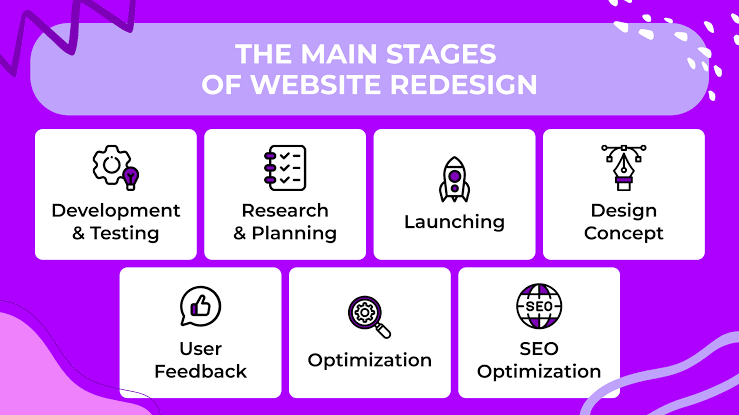
How to Plan a Successful Website Redesign
A successful redesign starts well before anyone begins working on the visual design. The planning stage helps prevent unnecessary expenses, missed requirements, and avoidable delays.
Step 1: Define What You Want to Achieve
Start by identifying the main reason for the redesign.
Do you want to generate more qualified enquiries? Make your services easier to understand? Improve mobile usability? Simplify content management? Strengthen your brand presentation?
Choose a few clear objectives instead of trying to change everything at once.
These objectives will guide decisions throughout the project and give you a practical way to evaluate the final result.
Step 2: Review Your Existing Website
Before replacing anything, understand what already works.
Review your most important pages, existing content, navigation, forms, mobile layouts, and website performance. If analytics are available, examine which pages attract visitors and which actions people complete.
Google Analytics can help you understand website traffic and visitor behaviour. Google Search Console can provide useful information about search queries, indexing, and search performance.
You can explore these resources here:
Do not assume that every old page needs to disappear. Some pages may already attract valuable search traffic or contain information customers rely on.
Step 3: Understand Your Audience
Your website should be designed around the needs of the people using it.
Consider what your customers want to know before contacting you or making a purchase. What concerns do they have? Which questions come up repeatedly? What information helps them compare options?
For a service business, visitors might want to understand the process, expected deliverables, pricing approach, and ways to get in touch.
For an online store, customers may care more about product details, delivery information, payment options, and return policies.
Understanding these differences helps you create a website that feels relevant rather than generic.
Step 4: Organise Your Pages and Navigation
A redesign is an opportunity to simplify the way information is organised.
Start by listing your essential pages. These might include the homepage, about page, service pages, product pages, blog, frequently asked questions, and contact page.
Next, group related information logically.
Avoid creating unnecessary pages simply because a competitor has them. Each page should have a clear purpose and help visitors complete a task or understand something important.
If you change existing URLs, plan appropriate redirects so visitors and search engines can reach the relevant replacement pages.
Step 5: Improve the Design and User Experience
Visual design matters, but it should support usability rather than distract from it.
Use readable typography, consistent spacing, a clear visual hierarchy, and colours that fit your brand. Make important information easy to scan, and ensure that buttons and links clearly communicate what happens when someone clicks them.
Pay particular attention to mobile users. Check how menus open, how forms behave, whether text remains readable, and whether important actions are easy to complete with a thumb.
A good design should make the next step obvious without making the visitor work to find it.
Step 6: Review Content and SEO Before Launch
Search engine optimisation should be part of the redesign process from the beginning.
Review your existing page titles, meta descriptions, headings, internal links, image alt text, and target search queries. Give important pages a clear purpose and make sure their content addresses real user needs.
Avoid changing URLs without a plan. When a page moves to a new address, use a relevant permanent redirect where appropriate and update internal links to point to the new URL.
You can also consult Google’s SEO Starter Guide for guidance on creating search-friendly websites.
Remember that a redesign does not automatically improve rankings. Search performance depends on multiple factors, including content relevance, technical accessibility, competition, and how search engines process the changes.
Step 7: Test Before Launching
A website that looks excellent in a design preview may still contain problems when used on real devices.
Before launch, test your key pages on different screen sizes and browsers. Check navigation, contact forms, buttons, links, images, and any integrations that the website depends on.
Review page speed and look for layout shifts or elements that become difficult to use on smaller screens.
Also confirm that analytics and other essential tracking tools are configured correctly. This will help you understand how the redesigned website performs after launch.
Step 8: Monitor Results After Launch
Launching the redesigned website is not the end of the process.
Compare performance against your original objectives. Look at relevant indicators such as qualified enquiries, completed purchases, form submissions, engagement with important pages, and organic search traffic.
Give search engines time to process significant changes, and investigate unexpected drops in traffic or conversions rather than assuming they will resolve themselves.
Use what you learn to make targeted improvements. Often, a few informed adjustments can be more valuable than another complete redesign.
Common Website Redesign Mistakes to Avoid
Even a well-intentioned redesign can create problems if important details are overlooked.
Changing everything without reviewing existing performance. Your current website may contain useful pages, content, and search visibility worth preserving.
Focusing only on appearance. An attractive website still needs clear information, usable navigation, accessible content, and working functionality.
Ignoring mobile users. The website should be practical on smaller screens, not simply shrink down from the desktop version.
Forgetting SEO during development. Missing redirects, changed URLs, deleted content, and accidental indexing restrictions can damage search visibility.
Adding features without a clear purpose. Every new feature should solve a problem or support a genuine business need. Complexity for its own sake can make a website harder to maintain.
Treating launch day as the finish line. Real-world usage reveals opportunities for improvement that may not be obvious during development.
How Much Does a Website Redesign Cost?
There is no single price for a website redesign because the scope of work can vary significantly.
A simple visual refresh may require relatively little work, while a larger project involving custom development, extensive content changes, integrations, or eCommerce functionality will typically require a greater investment.
The final cost may depend on:
- The number and complexity of pages.
- Whether the website needs custom design or development.
- The amount of content that must be written or updated.
- Technical integrations and third-party tools.
- Migration, testing, and SEO requirements.
- Ongoing maintenance and support arrangements.
When comparing proposals, look beyond the initial price. Clarify exactly what is included, who will manage the content, how testing will be handled, and what support is available after launch.
A clearly defined project scope makes it easier to compare options and avoid unexpected costs.
Website Redesign Checklist
Before your redesigned website goes live, work through this practical checklist:
-
Business objectives and success measures are defined.
-
Existing website pages and important content have been reviewed.
-
Navigation and page structure are clear.
-
Mobile layouts and accessibility have been checked.
-
Page titles, meta descriptions, and headings have been reviewed.
-
URL changes and redirects have been planned.
-
Forms, links, buttons, and integrations have been tested.
-
Analytics and search monitoring tools are configured.
-
Backups and a recovery plan are available.
-
A post-launch review schedule has been planned.
Completing these checks will not guarantee a perfect launch, but it can reduce avoidable problems and make the transition more manageable.
Frequently Asked Questions
How often should a business redesign its website?
There is no fixed schedule that works for every business. Review your website regularly and consider a redesign when its usability, technology, brand presentation, or ability to support business goals no longer meets your needs.
Will a website redesign improve SEO?
It can create opportunities to improve content structure, mobile usability, technical accessibility, and page experience. However, rankings are not guaranteed to improve, and poorly managed URL or content changes can hurt performance.
Should I redesign my website or build a new one?
A redesign may be appropriate when your existing platform can support your requirements. A new build may make more sense when the underlying technology is too restrictive, difficult to maintain, or unsuitable for the functionality you need.
How long does a website redesign take?
The timeline depends on the website’s size, complexity, content requirements, feedback process, and technical needs. A straightforward project generally takes less time than a large website with custom functionality and multiple integrations.
Can I keep my existing website content?
Yes. In many cases, useful content should be retained and improved rather than discarded. Review each page for accuracy, usefulness, search performance, and relevance to your audience before deciding whether to keep, update, merge, or remove it.
Final Thoughts
A website redesign should make life easier for both your customers and your team.
The best results usually come from understanding existing problems, setting clear priorities, organising information thoughtfully, and testing the finished website before and after launch.
You do not need to change every element just because the website feels old. Sometimes, improving navigation, clarifying your messaging, updating key pages, and fixing usability issues can make a meaningful difference.
If your current website no longer reflects your business or supports your goals, take time to evaluate what needs to change and what is already working.
Explore HiveRift US to learn more about website solutions for your business, and start planning a website that better supports your next stage of growth.


